Automate

 View Only
Expand all | Collapse all

Soft warning stops script

  • 1.  Soft warning stops script

    Posted 09-26-2018 17:23
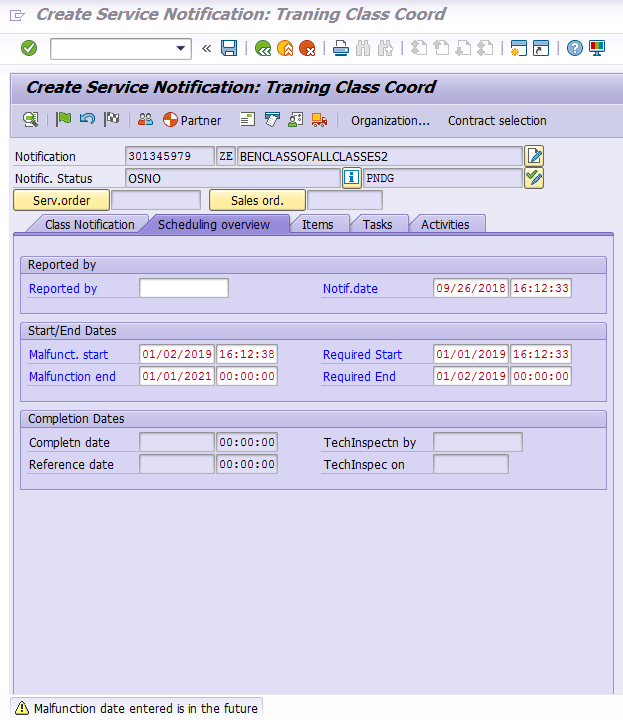
    When I am in IW52 or other transaction and a soft warning comes up when recording I enter through pressing enter a few times until it goes way. When I go though debug those additional enters do not show up. How do I add those enters in to pass though the soft warning? 


    ------------------------------
    Benjamin Kielas | SAP Master Data Team Lead
    Generac Power Systems, Inc. | [City] | 262-544-4811
    ------------------------------


  • 2.  RE: Soft warning stops script

    Posted 09-27-2018 02:58
    Hi Ben,

    This would have been recorded but will only be visible within the Expert mode of Winshuttle.


    ------------------------------
    Many Thanks,
    Adam Treadwell
    SAP Integration Manager
    Jaguar Land Rover
    ------------------------------


  • 3.  RE: Soft warning stops script

    Posted 09-27-2018 09:30
    ​Is it a pop-up screen or just soft error at the bottom of SAP?

    ------------------------------
    Brad Barton | Financial Systems Manager
    The Mosaic Company | Tampa, FL | 813-284-1780
    ------------------------------


  • 4.  RE: Soft warning stops script

    Posted 09-27-2018 15:20
    ​It shows only as a soft yellow warning at the bottom of SAP. There is no popups. The warning comes after the first enter to add the dates then two more enters after to finally have the warning to show at the bottom.

    I think I need to add in to the expert view the screen I am on and add a enter button two times but I do not recall how to look up the screen name and write in expert view that well. I only have been using Winshuttle for 6 months.

    ------------------------------
    Benjamin Kielas | SAP Master Data Team Lead
    Generac Power Systems, Inc. | [City] | 262-544-4811
    ------------------------------


  • 5.  RE: Soft warning stops script

    Posted 09-27-2018 15:15
    ​The expert view dose not show the needed enter though in the script recording. I rerecorded as well to confirm.

    ------------------------------
    Benjamin Kielas | SAP Master Data Team Lead
    Generac Power Systems, Inc. | [City] | 262-544-4811
    ------------------------------


  • 6.  RE: Soft warning stops script

    Posted 09-28-2018 04:18

    You can get the correct Screen + Field by pressing F1 in SAP field --> Technical setting

     Like here

     technical information

    Then you can copy that same screen in WS

    multiple times… and you could copy only the OKCODE & Screen

    Enter or OK code is usually in these cases /00
    (if that is really needed … if debug needs the enters, real run might not)


    you would be basically adding something like this

    OK in WS 

    Now notice the skip screen indicators have been activated,

    that might come handy in this also.


    ------------------------------
    Heikki Heinonen | SAP Specialist
    Saint-Gobain Rakennustuotteet Oy | [City] | 0400 172 698
    ------------------------------


  • 7.  RE: Soft warning stops script

    Employee
    Posted 10-02-2018 01:40
    Hey Benjamin,

    When recording and running in SAP, Winshuttle will automatically bypass any soft warning messages (any message in yellow in the bottom left corner) for every recording mode except for GUI Scripting. For all other modes, you won't need to enter these in your script as they are handled automatically.

    Can you confirm which recording mode you are using to record this script?

    ------------------------------
    James Lofgren | Solutions Engineer
    Winshuttle North America | [Bothell, WA] | 800-711-9798
    ------------------------------


  • 8.  RE: Soft warning stops script

    Posted 10-03-2018 08:54
    ​James,

    I am not sure why but my scripts (not GUI Scripting) always stop on any soft errors, even the ones in green.  It doesnt matter if I get the error during recording or not, the record will fail everytime if there is a soft error. 

    As an example, the first time I extend a material to a sales org using MM01 I need to add the transportation group.  That field is a MARA Table field (MARA-TRAGR) and will be greyed out for subsequent extensions to new sales orgs.  If I run a script with that field selected the load will fail on the second extension with an soft error that says that it is not an input field.  I have to have a conditional statement to check to see if the field is blank before executing the load.

    I wish that winshuttle would ignore the warnings but I find that it is not always the case.

    ------------------------------
    Greg Papendick | Director, Master Data Management
    Dairy Farmers of America, Inc. | [City] | 8168016458
    ------------------------------


  • 9.  RE: Soft warning stops script

    Employee
    Posted 10-12-2018 13:05
    Hey Greg,

    Thanks for the additional information!

    Generally the "not an input field" error is a hard error in SAP when trying to run a script. One way to check is to run the script in Debug mode when you see that error to see if it shows up as a Red message or a Yellow message in your system. This is an error that would prevent the script from being able to execute successfully.

    In the example you provided, using the Skip Indicator may be the best route since the field may or may not be enabled. With this, you can use a specific character in your data file (the default is '\') and that will make sure that Winshuttle doesn't try to input data on that field to avoid this error. You can also set the indicator the {BLANK} so it will only try to enter the data through the script on fields where you enter data on your Excel file.

    Here is a link to the help page on this feature:

    Run settings for Transaction, Studio v12


    - James

    ------------------------------
    James Lofgren | Solutions Engineer
    Winshuttle North America | [City] |
    ------------------------------


  • 10.  RE: Soft warning stops script

    Posted 11-09-2018 08:18

    ​James,

    I have not been able to get back here for a while and missed your response.  SAP has this as a Green Warning, not even a yellow warning and yet my scripts will fail.  Sometimes the only way to deal with it is to download the field and then do a conditional on if it is empty or not. 

    I run into this a lot with Winshuttle and it can be very annoying.  I would have to go back and verify but I believe that I have seen this even with the currsor position statements for fields that do not show up during some runs.  I have learned to remove all of my cursor position statements when mapping.

    Best Regards,
    Greg


    ------------------------------
    Greg Papendick | Director, Master Data Management
    Dairy Farmers of America, Inc. | [City] | 8168016458
    ------------------------------


  • 11.  RE: Soft warning stops script

    Employee
    Posted 11-09-2018 11:14
    Hi Benjamin, 

    Warnings usually do not stop scripts from running.  In my almost 9 years with working with Transaction/Sutido, I may have run into this once or twice, and I have created a lot of scripts.

    The additional enters are not captured nor needed in the script.  Winshuttle will usually take care of that for you.  If you do run into one that causes issues, and some have stated they have run into this , too.

    If you'd like to share your script, some of us in the community may be able to think of a workaround.  Read only/disabled fields are often in that state because of other data you have entered, so often IF statements based on that other data may help.

    If it's not just disabled fields causing the warnings that stop the script, I would also suggest that you open a ticket with Support, so that we can get to the bottom of what is happening and get it fixed, if at all possible.   This will help you and anyone else who runs into this issue.

    One last suggestion - if the t-code is really problematic, you might consider a BAPI or remote-enabled function module, if there is one.

    Best Regards,
    Sigrid

    ------------------------------
    Sigrid Kok
    PSE | Winshuttle North America
    ------------------------------


  • 12.  RE: Soft warning stops script

    Posted 11-19-2018 04:40
    The problem with green warnings is that while the script passes the OK code and already at the next screen, SAP does not proceed to the next screen. Worse even, troubleshooting is rather difficult as SAP will not tell you the error message through the log field (only if you manually simulate the same data entry in SAP will you see the warning message).

    What you will see in the Winshuttle log field is that the script fails to find the first field on the next screen. That is how I usually recognize that SAP has not managed to proceed to the next screen, so I am probably dealing with a green warning.

    Where I face these issues is usually the MRP fields in material master, where certain field value combinations bring the warning up. The problem is that I cannot predict what combinations will bring up the error, so usually I only face it when the end-user complains.
    The solution for me was to control data entry instead of handling this through the script, which I found rather difficult.

    It would be nice if SAP passed the content of the green warning message to the Winshuttle log, not sure why it does not.
    It works for the yellow warning (extended log) and the red error (short log).
    That way at least troubleshooting would be easier.

    Attila

    ------------------------------
    Attila Nemeti | Master Data Operational Excellence Specialist
    Celanese International Corporation | [City] | +3616277652
    ------------------------------