Hi Jennifer,
Thank you for your quick replay
Yes, you got the point. I recorded exactly how you said: I choose "Item" to be used, but it seems when I run the scrip it is not there.
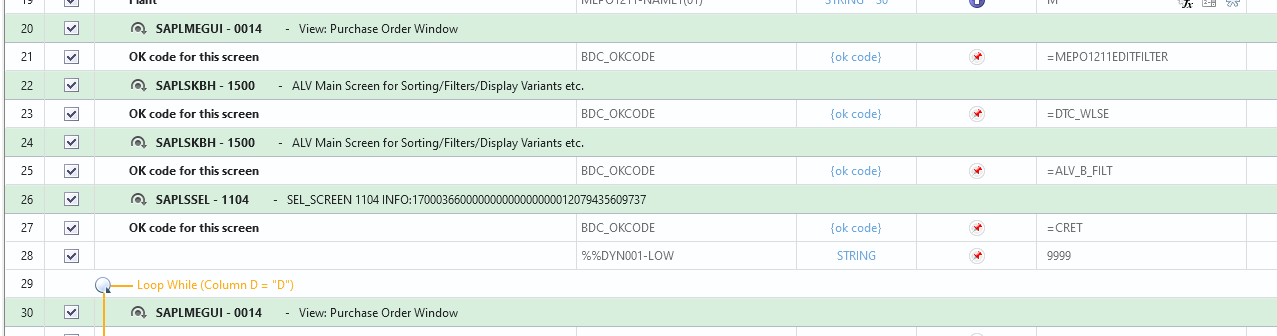
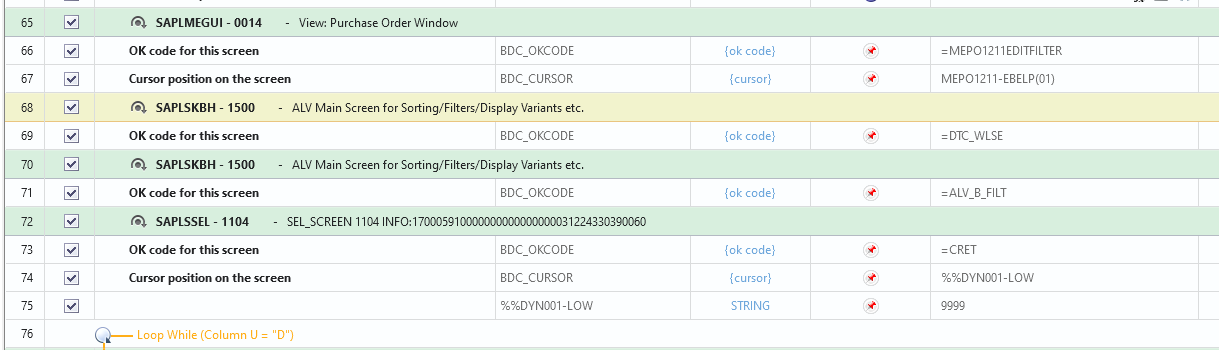
Debugging the script, the error happens in that screen. See below your template, same part in mine and the screen where i get the error.
Template
My script
Error
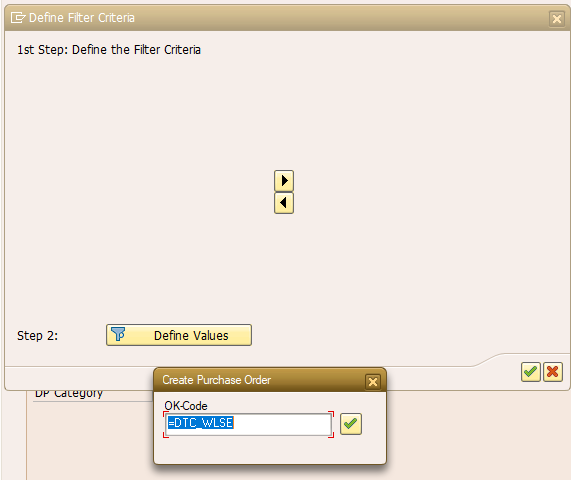

So, the script finish after step with the error above.
Thank you
Helder
------------------------------
helder souza | manager
Hydro Aluminium | +4746936923
------------------------------
Original Message:
Sent: 06-22-2021 09:08
From: Jennifer Hwang
Subject: ME21N - PO creation with multiple items
Hi Helder -
Do you mean the field that you want to be able to filter on? From your screenshot, you actually cut off the part that would have shown the filtering field (row 126 is the screen name). Are you saying nothing is showing there?
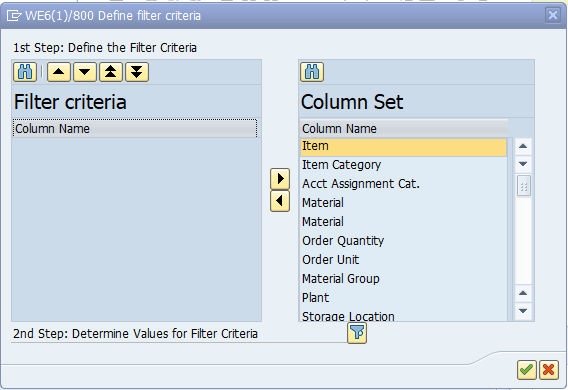
What field(s) below do you want to use for filtering? You need to single click and select which field(s) you want to include in your filter and left arrow each of them to add it to the filter criteria. If you do not explicitly select one, it will only pick the default one at the top, which is typically selected by default, and use that as the criteria. In the example below it will use Item. In the template, it also uses Item.
What error are you getting? Did you record in batch mode?
Thank you,
------------------------------
Jennifer Hwang | SE
Winshuttle North America
Original Message:
Sent: 06-22-2021 06:16
From: helder souza
Subject: ME21N - PO creation with multiple items
Hi Jennifer,
Thank you very much for this example.
I have created a script based on your tips, but I get an error in the step to apply the filter.
It seems the field to apply the filter is not being defined. Is there any parameter missing here?

Thank you
Helder
------------------------------
helder souza | manager
Hydro Aluminium | +4746936923
Original Message:
Sent: 01-05-2021 09:38
From: Jennifer Hwang
Subject: ME21N - PO creation with multiple items
Hi Gilda -
We do have an ME21N template available. Feel free to look at that one so you can get an idea on how to create the script properly.
It should be recorded in Batch mode and you need to use the Filter in order to create the loop. The first line item also needs to be entered in the Header row, not the Detail row.
https://community.winshuttle.com/sap-module-templates/viewdocument/create-purchase-order?CommunityKey=8a12989f-fefe-4b81-8147-4bbb11af6820&tab=librarydocuments
Thank you!
------------------------------
JENNIFER HWANG | SE
Winshuttle North America
Original Message:
Sent: 01-05-2021 03:32
From: Gilda Govier
Subject: ME21N - PO creation with multiple items
Happy New Year
I have created a script to create multiple line POs (ME21M). I have followed the online instructions however when I run it it fails.
Does anyone have any advice on how to create one that does not fail?
------------------------------
Gilda Govier |
L'Oréal (U.K.) Ltd |
------------------------------