Automate

 View Only
Expand all | Collapse all

Using "Match" to Identify Errors in Workflow

  • 1.  Using "Match" to Identify Errors in Workflow

    Posted 07-19-2021 09:45
    Hi Friends,
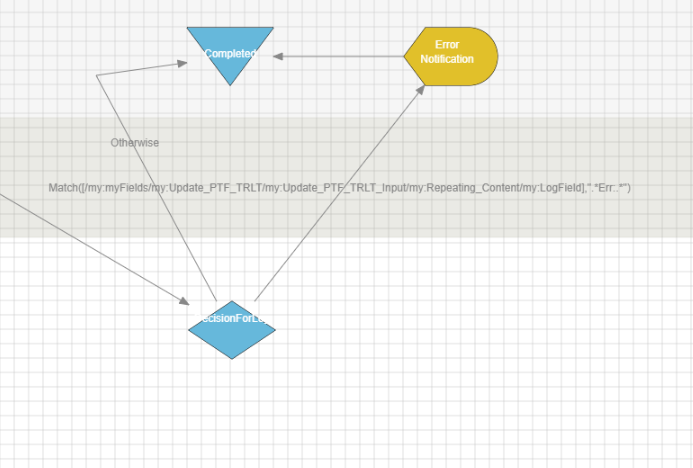
    We have a simple MM02 web form solution to update material master fields.  We have created the form with a repeating data section as the user will most likely submit several materials at once.  The form routes for approval and then a plug in runs the Winshuttle script.  If there are no errors we would like the process to complete.  If there are errors for one or more of the materials we would like the workflow to send a notification to the originator notifying them of the errors.  We have tried to do this using the "Match" function on the Logfield and if the Logfield contains "Err" then send the notification.  However this only works for the first material.  If the first material runs without errors,  yet the remaining materials are errors, the Match function does not recognize it as an error.  Here is my workflow below at the decision node.  Is there a better way to do this rather than using Match?

    As always; Thank you!
    Krista


    ------------------------------
    Krista Zinna | Master Data Specialist
    Timken Company | 234-262-2008
    ------------------------------


  • 2.  RE: Using "Match" to Identify Errors in Workflow

    Employee
    Posted 07-20-2021 10:35
    Hey Krista,

    In each solution there should be a solution field that is automatically created called ErrorRows. This field is an integer to tell you how many errors were in the previous AutoRun plugin. You should be able to directly use "ErrorRows == 0" to confirm that there were no errors.

    Here is a link to the documentation that provides a more in-depth example: https://winshuttle-help.s3.amazonaws.com/foundation/en/composer/composer-plugins-autopost.htm

    ------------------------------
    James Lofgren | Solution Engineer
    Winshuttle North America | [City] |
    ------------------------------


  • 3.  RE: Using "Match" to Identify Errors in Workflow

    Posted 07-20-2021 10:44
    Hey James,
    Maybe I'm missing something but I have not been able to find that solution field.  We have that field when we create an Excel Workflow and we are able to use it but in this solution, where we have a Web Form with repeating content, it is not an option which is why we tried "Match".   See below - it is not included in available fields.  Should I be looking somewhere else?


    ------------------------------
    Krista Zinna | Master Data Specialist
    Timken Company | 234-262-2008
    ------------------------------


  • 4.  RE: Using "Match" to Identify Errors in Workflow

    Employee
    Posted 07-20-2021 12:27
    Hi Krista

    I believe James's recommendation was for excel workflows.  For form workflows, I usually add 2 whole integer fields outside of the table and use rules like below.

    1. You'll have to swap in what is a valid success - it basically counts the log field where it contains whatever string you have.  the pipe "|" is a separator, so it says count if it contains 'Condition records saved' OR ' Success':   count('/my:myFields/my:VK11/my:VK11_Input/my:Repeating_Content/my:LogField_CM',"Condition records saved|Success");
    2. and for errors.  It's looking for the string 'Err:' in the logfield and counts them count('/my:myFields/my:VK11/my:VK11_Input/my:Repeating_Content/my:LogField_CM',"Err:");

    Then you can promote and use the counts to direct the workflow.

    HTH
    Sigrid

    ------------------------------
    Sigrid Kok
    PSE | Winshuttle NA
    ------------------------------


  • 5.  RE: Using "Match" to Identify Errors in Workflow

    Posted 08-02-2021 14:13
    Hi Sigrid - I was able to get the Count function to work for my solution to get a field outside of my table that counts the error rows.  Now I am stuck on how to incorporate this into the workflow.  Here is what I have below.   After the update runs with the Process Form plug in, there is a decision with an otherwise transition and a transition that is [/my:myFields/my:Log_Field_Error_Count] >= 1.  This would lead the workflow to an error notification.  I've tried promoting the field to a Solution field and that doesn't seem to work. I've also tried putting a Wait Plug In between the Process Form and Decision node, thinking maybe some time was needed to update the Error Count, however this is still not working.  Is my formula wrong ?  The Error Count field is calculating correctly but my condition/transition does not seem to be recognizing that it is met. 

    Thanks
    Krista


    ------------------------------
    Krista Zinna | Master Data Specialist
    Timken Company | 234-262-2008
    ------------------------------


  • 6.  RE: Using "Match" to Identify Errors in Workflow

    Employee
    Posted 08-02-2021 14:23
    Hi Krista

    Congrats on the progress!

    Two things:
    • set a default value of the counts to 0
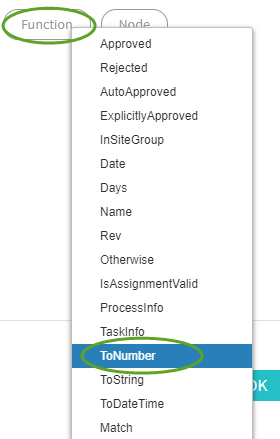
    • use the ToNumber function, in case it is resolving to text instead of  numeric.  it would look something like this, with ErrorRows a promoted count field:  ToNumber([ErrorRows]) >= 0
    HTH
    Sigrid

    ------------------------------
    Sigrid Kok
    PSE | Winshuttle NA
    ------------------------------


  • 7.  RE: Using "Match" to Identify Errors in Workflow

    Posted 08-02-2021 14:41
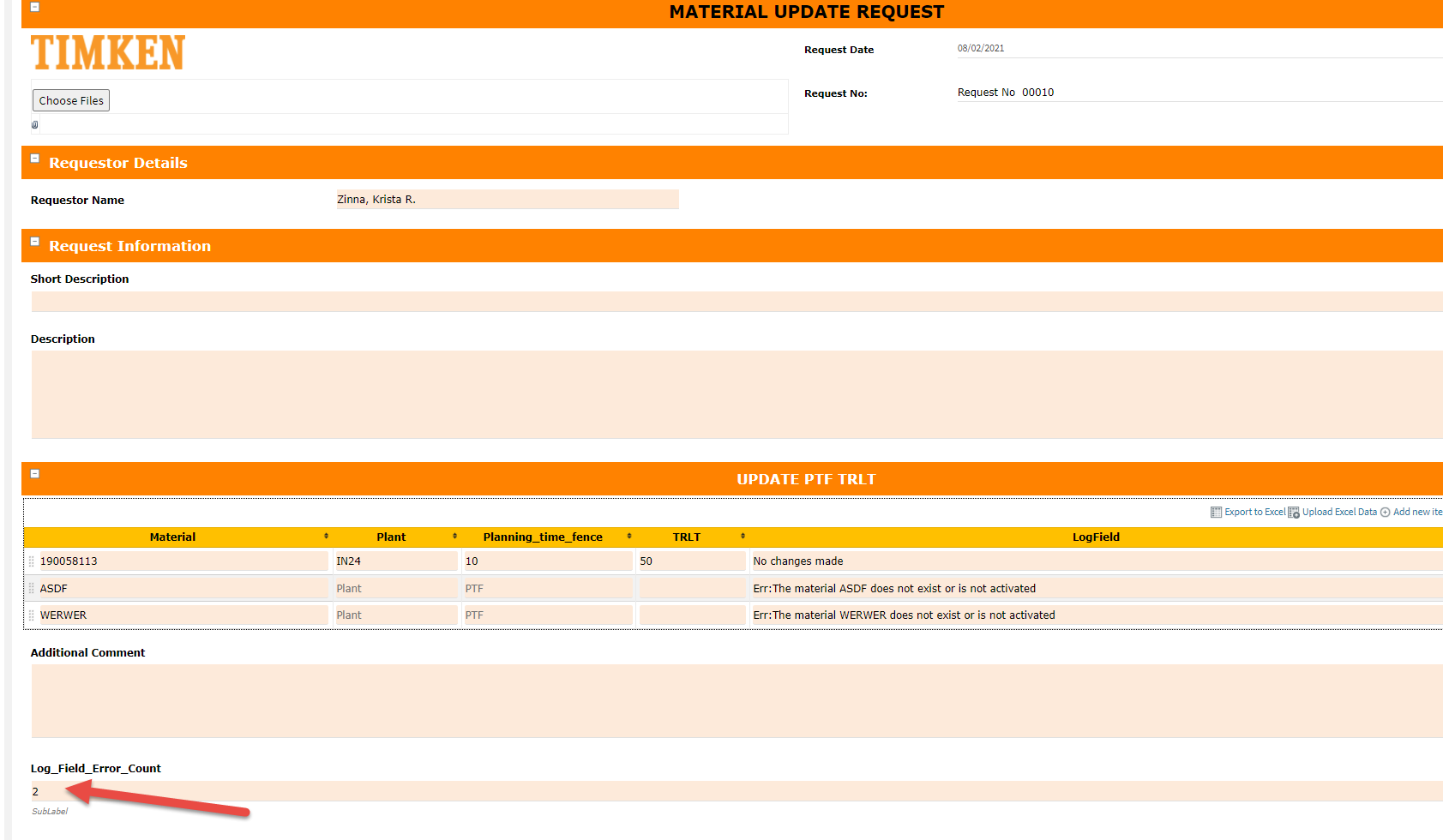
    Hi Sigrid - this didn't seem to work.  Also, when I promoted the field to a solution field it is not showing the proper value when I view in Documents in the Solution.  Is there another action I need to take in order for the correct value from the form field to pass into the solution field?  See below for Request 10, Error Count reads zero. 



    But the completed document the value is 2.  Why would the correct value not show in the Solution Promoted Field?


    ------------------------------
    Krista Zinna | Master Data Specialist
    Timken Company | 234-262-2008
    ------------------------------


  • 8.  RE: Using "Match" to Identify Errors in Workflow

    Employee
    Posted 08-02-2021 14:49
    Hi Krista

    Looks like you're close.  It looks like your count is correct on your form.

    Is the field referred to anywhere else?  In any other rules?  Is the default being refreshed?  

    Also on the Solution tab please double check your solution fields, in case you have it in there with another name
    and/or double check your fields for the solution

    Best Regards,
    Sigrid

    ------------------------------
    Sigrid Kok
    PSE | Winshuttle NA
    ------------------------------


  • 9.  RE: Using "Match" to Identify Errors in Workflow

    Posted 08-03-2021 09:15
    Hi Sigrid - I checked and all looks good.  Does the workflow only look at the field values upon submission of the form, or does it continue to evaluate the field values at each step of the workflow? If only at the submission of the form, then it would be an issue since the Error Count does not calculate until after the Winshuttle Update runs.  If it definitely looks at the values at each step, then I will continue to troubleshoot and try to figure this out.  Thanks again.

    ------------------------------
    Krista Zinna | Master Data Specialist
    Timken Company | 234-262-2008
    ------------------------------


  • 10.  RE: Using "Match" to Identify Errors in Workflow

    Employee
    Posted 08-03-2021 10:55
    Hi Krista,

    The value of any field can change at any point in the workflow, whether calculated or entered. 

    For the workflow transitions, it is based on the value of the field(s) used at that point in time.

    Have you checked the promoted values while it is in transition?  You stated that the errors are 0 at the end.  Are you not checking for errors and forcing someone to correct and post them correctly?  In other words, typically a solution will make the participants correct and reprocess errors.

    Best Regards,
    Sigrid

    ------------------------------
    Sigrid Kok
    PSE | Winshuttle NA
    ------------------------------


  • 11.  RE: Using "Match" to Identify Errors in Workflow

    Posted 08-03-2021 11:24
    Hi - I didn't say the errors are 0 at the end.  The promoted values are calculating correctly while in transition (but not appearing correct in the documents/tasks pages).  We are not yet requiring users to go back and correct, we are just completing the process and notifying them that there were errors that they need to review.  I'm stuck at this point.  The values are correct on the form but for some reason they are not being recognized within the workflow.   I'll submit a support ticket.  Thanks for your help.

    ------------------------------
    Krista Zinna | Master Data Specialist
    Timken Company | 234-262-2008
    ------------------------------


  • 12.  RE: Using "Match" to Identify Errors in Workflow

    Employee
    Posted 08-03-2021 11:47
    Sorry if I misunderstood, Krista.  

    I would triple check the solution fields and match them up with what you're seeing in the completed data list.

    I think it's a good idea to involve support at this point, as well.

    Best Regards,
    Sigrid

    ------------------------------
    Sigrid Kok
    PSE | Winshuttle NA
    ------------------------------