Hi Carol
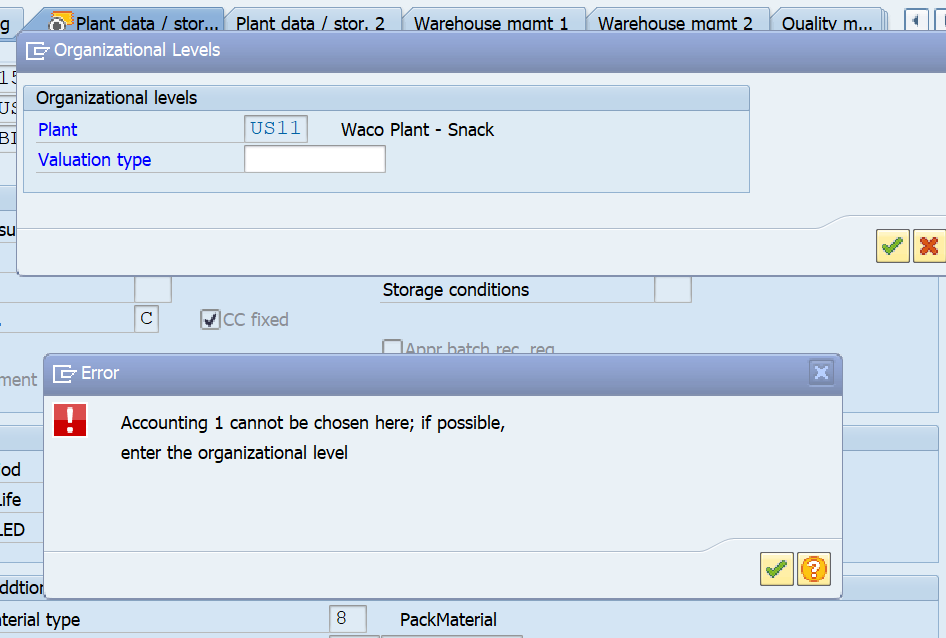
That IF won't work, because it won't allow you to go to the accounting view, since it's already created. If you can't go to the view, the IF cannot be evaluated.
You'd have to find some way to skip that view entirely - either based on entering the values or not in Excel, or perhaps running a query first to see if it's already been defined for that plant.
FYI
Sigrid
------------------------------
Sigrid Kok
PSE | Winshuttle NA
------------------------------
Original Message:
Sent: 02-16-2022 11:45
From: Carol Biondo
Subject: MM01 Extend to Plant script error
Hi,
I am extending to the plant and when I go from the plant/data storage 1 tab to the accounting tab, I get the following error message. Acctg 1 cannot be chosen here. How do I code the script to by pass this pop up? Below is what I have done with an if statement. This pop up only occurs when the material has already been extended to the plant the first time but now you are adding different storage locations and whse numbers.

------------------------------
Carol Biondo | Material Master FE
Mars Information Services US HQ | (908) 852-1000
------------------------------