HI Angeline,
In general, you can map one column to multiple fields in your script, if that's what you're trying to accomplish. Make sure you you choose the mapping type as PRESERVE - otherwise it will insert before or replace the mapping. In this way, you can map multiple script fields to the same Excel column.
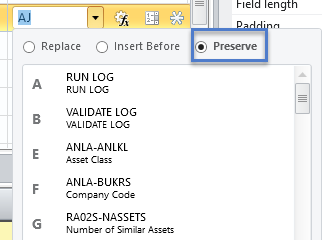
Overall for assets, you can capture each field in the depreciation area grid as a separate field.
You can also treat it like a table. But if you do that, I would recommend using the SAP BAPI: BAPI_FIXEDASSET_CREATE1. If you need an example of that, let me know, and I'll post one on the site. I just built out an example for a demonstration in our S4 system, so it's fresh on my mind.
Hope this helps.
Best Regards,
Sigrid
------------------------------
Sigrid Kok
PSE | Winshuttle North America
------------------------------
Original Message:
Sent: 04-09-2019 06:58
From: Angeline Descalsota
Subject: Asset Creation Template
Hi,
I am new to winshuttle and would like to check if someone can help on my problem?
We recently migrated to S4 HANA, I need to create some templates -like assets, vendor etc
My question is: When I go to asset creation (AS01) everything is fine until in the depreciation area.
How can make one column in mapper field in depreciation key for all depreciation area?
Sample:
If I put 0000 to 01. book Dep then the 11, 15 should be updated as 0000 as well.
Same goes for useful life and depreciation start date.
Im having a hard time figuring this one. hope someone can help.
Thank you.

------------------------------
Angeline Descalsota | Senior Associate
LAZADA SOUTH EAST ASIA PTE. LTD. | 085817785646
------------------------------