Hi Vicki
Not 100% sure of all that you'll run into, but you might see something like this on the 2nd and subsequent storage locations.
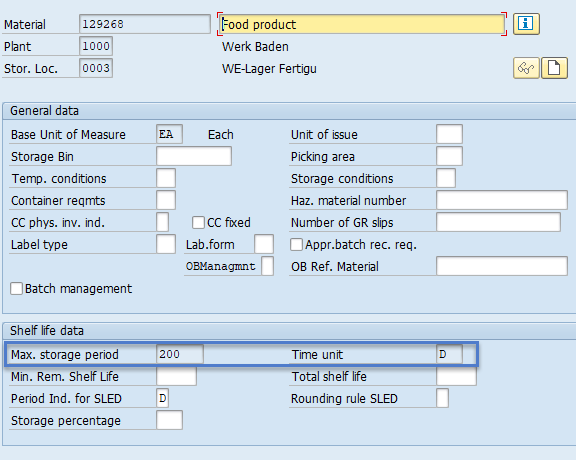
There is a "trick" for that. It's an IF on SAP field, which uses the "geeky" field name. For all of the fields that might be filled in from a prior run and thus read only, you can do something like this

I move the IF Condition window to the side so I can see the geeky name when I compose the IF statement. You can simply start typing it or use the dropdown to find it. I type it - it's easier.
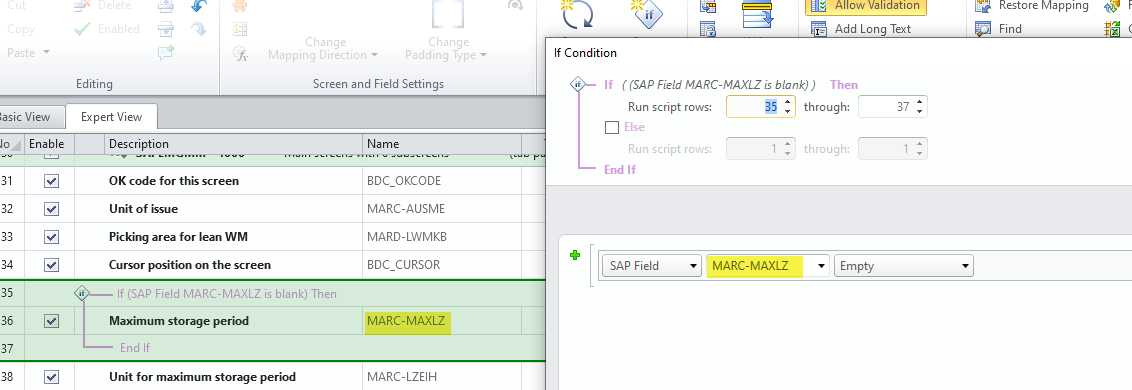
The way this works, if the SAP field is empty, upload the value - which means it's your first storage location. If it's filled in, you'll know it's read only and don't pass it to SAP.
You'll have to do this for all of the fields that are already set and read only, but it does work.
Hope this helps,
Sigrid
------------------------------
Sigrid Kok
PSE | Winshuttle NA
------------------------------
Original Message:
Sent: 04-15-2021 13:08
From: Vicki Smith
Subject: MM01 CREATING PLANTS AND MULTIPLE STORAGE LOCATIONS
Hi Winshuttle Experts,
I have been trying to create one winshuttle script that supports plant creation and storage location, can anyone help me. I'm create the first plant/sloc, but when i go to do the next record, the plant is already created, and the slocs are failing to extend. What can I do?
------------------------------
Vicki Smith | Procurement/Sourcing Systems, Advisor
Southern California Edison (SCE) | 310-999-9284
------------------------------