Hi Anita -
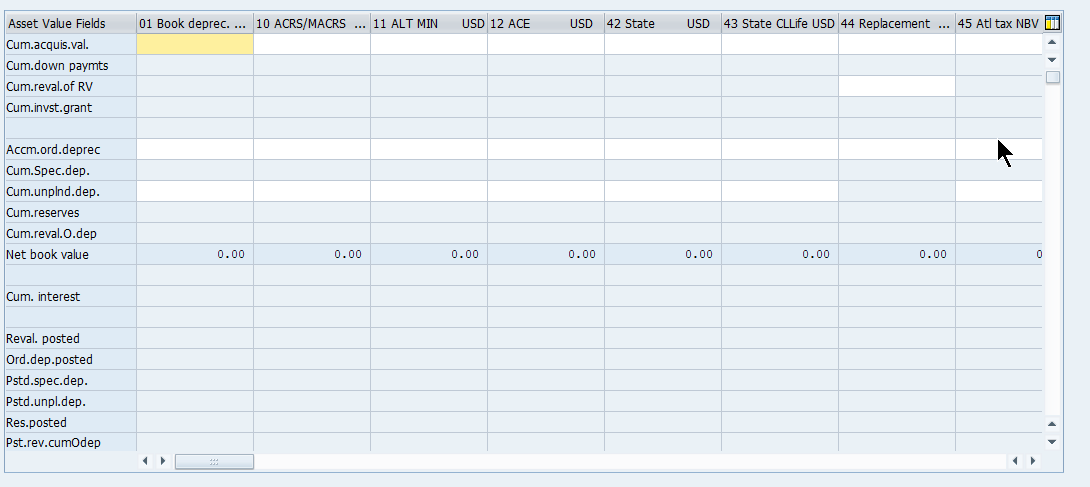
You should be able to do this with If on Index. That requires the use of GUI Scripting recording mode. You would have a regular loop, but right within the loop, you would have an If statement where, the Asset Value Fields value in SAP would be the Index Field, and you would be comparing it with a column in your Excel file that would have the exact matching Asset Value Field description that you want to update its Book depreciation column with. Because Asset Value Fields is not an editable field in SAP, you will need to identify it during the recording process by toggling the "Identify disabled fields" button in the pop-up.
If that doesn't work there seems to be a BAPI that may help instead: BAPI_FIXEDASSET_OVRTAKE_CREATE
Thank you!
------------------------------
Jennifer Hwang | SE
Winshuttle North America
------------------------------
Original Message:
Sent: 03-09-2021 14:40
From: anita mefford
Subject: AS91 Takeover Values
I'm doing a recording of AS91 and I need to complete takover values. I'm not sure what areas need to be filled out, these will vary depending on Asset chart. Is there a way to do a loop for this. For example, in column a of the excel spreadsheet the user could enter cum.acquis.val. on row 1 and accm.ord.deprec on row 2. then the script would loop and find the correct row in the table based on the name of the asset value field and fill in the depreciation areas. Or if you have any other idea on how to do this without having to put all this data on one row in excel let me know.
------------------------------
anita mefford | Analyst
ConocoPhillips | 19186614935
------------------------------