Hi Jac,
If I understand you correctly, I would publish everything individually and also chained. Then you can run what you want as you need it. Note this is only possible in the desktop version of Studio. With Studio Manager/Evolve & User Governance/Foundation, you could only publish individually or chained - not both.
Another option is to chain everything, and then use some type of flag for each script. Use an IF statement around the entire script (minus the log fields), and only run it if the flag is set to run.
Also, if you want to edit a chain, you can ask support for the Studio Utility to edit published scripts. Here's a screen shot
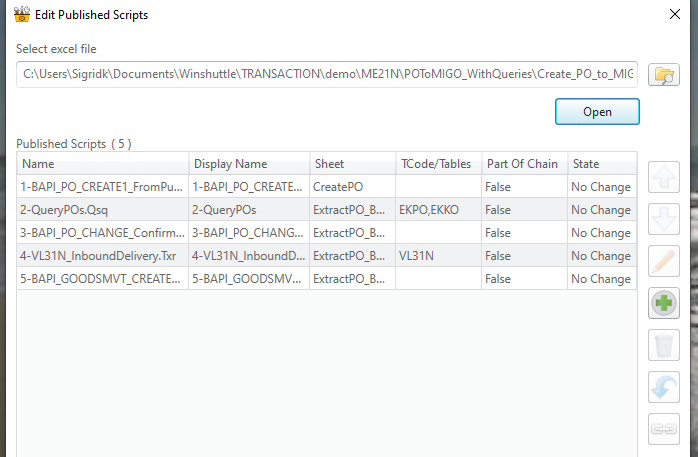
you can select and edit individual scripts, delete them, add them, etc.
You can also use the utility to convert v10.x chain, where each script had to be opened and point to the next script to run, to the newer method

BTW, we highly recommend upgrading to at least version 12.x, as v11 and lower is end of life:
https://docs.winshuttle.com/en-gen-support-info/product-support-availability-EOLproducts.htm Best Regards,
Sigrid
------------------------------
Sigrid Kok
PSE | Winshuttle NA
------------------------------