|
2.
RE: Query for longtext language codes
Hi Jana Glad you made progress! As to your question about running 2 Query controls, there isn't a message field that you can check to see when a Query is done to trigger the next one. And "stacking" the rules doesn't quite work. I tried to use a flag field (aka helper field) to trigger either (1) the 2nd Query control (2) a copy table rule to copy the language codes from one table to another. I tried a few different ways to trigger them, and neither worked off of the flag field, which was outside of the initial table I loaded from a reference data list. So my last resort was to try JavaScript. Did you know you can click on the ... next the to rule title and convert it to Javascript? It doesn't work for every single rule, but it does work for many,  you end up with this: $form.executeQuery('Query1'); where Query1 is your query control name. In that rule, I simply copied and pasted it for the 2nd query control, and it worked.  Hope that helps! Sigrid ------------------------------ Sigrid Kok PSE | Winshuttle NA ------------------------------
Original Message: Sent: 04-14-2022 03:31 From: Jana Kuschmierz Subject: Query for longtext language codes
Hello Sigrid Many thanks for your help. Now it's works in the repeating table "extending plants" the query runs when the item number is created. NEW PROBLEM J I want to do it now in the same way for the longtexts. I have 2 longtext. 1. Grunddatentext (sorry this is in German) 2. Vertriebstext Boths works in the same way. I would like to define 4 rows for 4 languages. When the user wants to create a longtext he have to do it in 4 languages mandatory. Now I have a query for the 4 languages codes. The query runs when the forms starts. And it fills the language code automatically in the rows of the text. It works for the first text. But not for the second one. I have now 2 queries (different names same content = languages codes). You can see it on the pictures. The codes for the first text comes accurately. But not for the second text.  Freundliche Grüsse Jana Kuschmierz Leiterin Verkaufsinnendienst
Tel. direkt: +41 62 887 70 34 Mobil: +41 79 127 07 74 jana.kuschmierz@rigips.ch _____________________________
Rigips AG Gewerbepark – Hintermättlistrasse 1 – 5506 Mägenwil – Schweiz Tel. +41 62 887 44 44 – www.rigips.ch  Es gelten die Allgemeinen Geschäftsbedingungen der Rigips AG, abrufbar unter rigips.ch/agb. Hi Jana Just so I understand, you're creating a single article. Then you want to extend that to the same set of plants/storage locations? If so... | | Re: AW: Winshuttle Open Forum : Extending Materials on a loop | | | | | | Hi Jana
Just so I understand, you're creating a single article. Then you want to extend that to the same set of plants/storage locations?
If so, one idea would be to: - create a reference list (or db table) with a Query control in the form to read in the set of plants/storage locations/etc. into a table in the form.
- Then use a rule to set the article number to the one generated. It will basically overwrite that field in all rows.
Hope that gives you an idea. If I missed it, please explain what I missed.
Best Regards, Sigrid
------------------------------ Sigrid Kok PSE | Winshuttle NA ------------------------------
| | | Reply to Group Online View Thread Recommend Forward Flag as Inappropriate | | | | |
3.
RE: Query for longtext language codes
Dear Sigrid Sorry I had holiday. The 2 queries should run in 2 repeating tables. The 1. Query runs when the form is started. I have no rule on a field in the repeating tale to run the query. I only define it in the properties in the query itself.  The 2. Query should also run when the form is started. I have no rule on a field in the repeating tale to run the query. I only define it in the properties in the query itself. So when you talk about the rule to convert. Where I have to make a rule on which field? And what I have to define in the properties of the query itself? I tried it in different ways but it doesn't work. Many thanks for your feedback. Freundliche Grüsse Jana Kuschmierz Leiterin Verkaufsinnendienst
Tel. direkt: +41 62 887 70 34 Mobil: +41 79 127 07 74 jana.kuschmierz@rigips.ch _____________________________
Rigips AG Gewerbepark – Hintermättlistrasse 1 – 5506 Mägenwil – Schweiz Tel. +41 62 887 44 44 – www.rigips.ch  Es gelten die Allgemeinen Geschäftsbedingungen der Rigips AG, abrufbar unter rigips.ch/agb.
Original Message: Sent: 4/14/2022 12:57:00 PM From: Sigrid Kok Subject: RE: Query for longtext language codes
Hi Jana
Glad you made progress!
As to your question about running 2 Query controls, there isn't a message field that you can check to see when a Query is done to trigger the next one. And "stacking" the rules doesn't quite work.
I tried to use a flag field (aka helper field) to trigger either (1) the 2nd Query control (2) a copy table rule to copy the language codes from one table to another. I tried a few different ways to trigger them, and neither worked off of the flag field, which was outside of the initial table I loaded from a reference data list.
So my last resort was to try JavaScript. Did you know you can click on the ... next the to rule title and convert it to Javascript? It doesn't work for every single rule, but it does work for many,
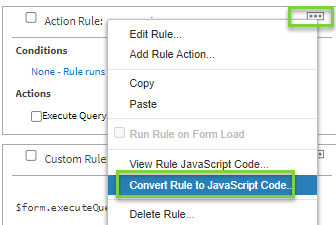
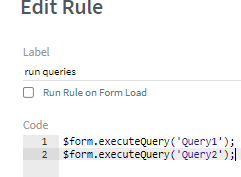
you end up with this: $form.executeQuery('Query1'); where Query1 is your query control name.
In that rule, I simply copied and pasted it for the 2nd query control, and it worked.
 Hope that helps! Sigrid
------------------------------ Sigrid Kok PSE | Winshuttle NA ------------------------------
Original Message: Sent: 04-14-2022 03:31 From: Jana Kuschmierz Subject: Query for longtext language codes
Hello Sigrid Many thanks for your help. Now it's works in the repeating table "extending plants" the query runs when the item number is created. NEW PROBLEM J I want to do it now in the same way for the longtexts. I have 2 longtext. 1. Grunddatentext (sorry this is in German) 2. Vertriebstext Boths works in the same way. I would like to define 4 rows for 4 languages. When the user wants to create a longtext he have to do it in 4 languages mandatory. Now I have a query for the 4 languages codes. The query runs when the forms starts. And it fills the language code automatically in the rows of the text. It works for the first text. But not for the second one. I have now 2 queries (different names same content = languages codes). You can see it on the pictures. The codes for the first text comes accurately. But not for the second text.  Freundliche Grüsse Jana Kuschmierz Leiterin Verkaufsinnendienst
Tel. direkt: +41 62 887 70 34 Mobil: +41 79 127 07 74 jana.kuschmierz@rigips.ch _____________________________
Rigips AG Gewerbepark – Hintermättlistrasse 1 – 5506 Mägenwil – Schweiz Tel. +41 62 887 44 44 – www.rigips.ch  Es gelten die Allgemeinen Geschäftsbedingungen der Rigips AG, abrufbar unter rigips.ch/agb. Hi Jana Just so I understand, you're creating a single article. Then you want to extend that to the same set of plants/storage locations? If so... | | Re: AW: Winshuttle Open Forum : Extending Materials on a loop | | | | | | Hi Jana
Just so I understand, you're creating a single article. Then you want to extend that to the same set of plants/storage locations?
If so, one idea would be to: - create a reference list (or db table) with a Query control in the form to read in the set of plants/storage locations/etc. into a table in the form.
- Then use a rule to set the article number to the one generated. It will basically overwrite that field in all rows.
Hope that gives you an idea. If I missed it, please explain what I missed.
Best Regards, Sigrid
------------------------------ Sigrid Kok PSE | Winshuttle NA ------------------------------
| | | Reply to Group Online View Thread Recommend Forward Flag as Inappropriate | | | | |
4.
RE: Query for longtext language codes
Hi Jana You can use a rule on the form view load to run one or both queries if they're not both running on load based on the query control setting. FYI Sigrid ------------------------------ Sigrid Kok PSE | Winshuttle NA ------------------------------
Original Message: Sent: 04-25-2022 13:12 From: Jana Kuschmierz Subject: Query for longtext language codes
Dear Sigrid Sorry I had holiday. The 2 queries should run in 2 repeating tables. The 1. Query runs when the form is started. I have no rule on a field in the repeating tale to run the query. I only define it in the properties in the query itself.  The 2. Query should also run when the form is started. I have no rule on a field in the repeating tale to run the query. I only define it in the properties in the query itself. So when you talk about the rule to convert. Where I have to make a rule on which field? And what I have to define in the properties of the query itself? I tried it in different ways but it doesn't work. Many thanks for your feedback. Freundliche Grüsse Jana Kuschmierz Leiterin Verkaufsinnendienst
Tel. direkt: +41 62 887 70 34 Mobil: +41 79 127 07 74 jana.kuschmierz@rigips.ch _____________________________
Rigips AG Gewerbepark – Hintermättlistrasse 1 – 5506 Mägenwil – Schweiz Tel. +41 62 887 44 44 – www.rigips.ch  Es gelten die Allgemeinen Geschäftsbedingungen der Rigips AG, abrufbar unter rigips.ch/agb.
Original Message: Sent: 4/14/2022 12:57:00 PM From: Sigrid Kok Subject: RE: Query for longtext language codes
Hi Jana
Glad you made progress!
As to your question about running 2 Query controls, there isn't a message field that you can check to see when a Query is done to trigger the next one. And "stacking" the rules doesn't quite work.
I tried to use a flag field (aka helper field) to trigger either (1) the 2nd Query control (2) a copy table rule to copy the language codes from one table to another. I tried a few different ways to trigger them, and neither worked off of the flag field, which was outside of the initial table I loaded from a reference data list.
So my last resort was to try JavaScript. Did you know you can click on the ... next the to rule title and convert it to Javascript? It doesn't work for every single rule, but it does work for many,
you end up with this: $form.executeQuery('Query1'); where Query1 is your query control name.
In that rule, I simply copied and pasted it for the 2nd query control, and it worked.
 Hope that helps! Sigrid
------------------------------ Sigrid Kok PSE | Winshuttle NA
Original Message: Sent: 04-14-2022 03:31 From: Jana Kuschmierz Subject: Query for longtext language codes
Hello Sigrid Many thanks for your help. Now it's works in the repeating table "extending plants" the query runs when the item number is created. NEW PROBLEM J I want to do it now in the same way for the longtexts. I have 2 longtext. 1. Grunddatentext (sorry this is in German) 2. Vertriebstext Boths works in the same way. I would like to define 4 rows for 4 languages. When the user wants to create a longtext he have to do it in 4 languages mandatory. Now I have a query for the 4 languages codes. The query runs when the forms starts. And it fills the language code automatically in the rows of the text. It works for the first text. But not for the second one. I have now 2 queries (different names same content = languages codes). You can see it on the pictures. The codes for the first text comes accurately. But not for the second text.  Freundliche Grüsse Jana Kuschmierz Leiterin Verkaufsinnendienst
Tel. direkt: +41 62 887 70 34 Mobil: +41 79 127 07 74 jana.kuschmierz@rigips.ch _____________________________
Rigips AG Gewerbepark – Hintermättlistrasse 1 – 5506 Mägenwil – Schweiz Tel. +41 62 887 44 44 – www.rigips.ch  Es gelten die Allgemeinen Geschäftsbedingungen der Rigips AG, abrufbar unter rigips.ch/agb. Hi Jana Just so I understand, you're creating a single article. Then you want to extend that to the same set of plants/storage locations? If so... | | Re: AW: Winshuttle Open Forum : Extending Materials on a loop | | | | | | Hi Jana
Just so I understand, you're creating a single article. Then you want to extend that to the same set of plants/storage locations?
If so, one idea would be to: - create a reference list (or db table) with a Query control in the form to read in the set of plants/storage locations/etc. into a table in the form.
- Then use a rule to set the article number to the one generated. It will basically overwrite that field in all rows.
Hope that gives you an idea. If I missed it, please explain what I missed.
Best Regards, Sigrid
------------------------------ Sigrid Kok PSE | Winshuttle NA ------------------------------
| | | Reply to Group Online View Thread Recommend Forward Flag as Inappropriate | | | | |
This thread already has a best answer. Would you like to mark this message as the new best answer?
|