Automate

 View Only
  • 1.  installation Winshuttle Studio 12.1

    Posted 03-04-2022 08:38
    Dear Winshuttle Community,
    I just got a new computer ... Office 2013 professional plus installed.
    So I got the latest Studio 12.1 from Winshuttle site, installed it without any issues, and started working.
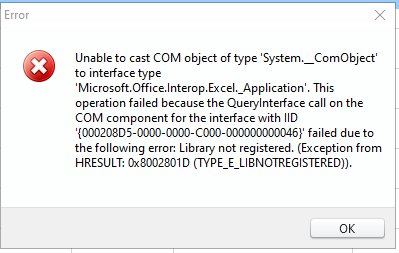
    In studio app, I did not have any issues (yet ?), but running a chain of scripts from Excel add-in I'm getting an error. (screenshot below). That very same chain for scripts does work on my old laptop and on the server I've been using for years now. So  the chain and scripts contained in it are definitly OK.
    Running one single script from the Excel add-in seems to work just  fine.
    Does anyone have a suggestion ?

    Many thanks, Jan

    ------------------------------
    jan ketele | Sr engineer release mgt
    Xeikon Manufacturing NV | +3234431875
    ------------------------------


  • 2.  RE: installation Winshuttle Studio 12.1

    Posted 03-07-2022 10:06
    Hi Jan,

    I recommend opening a ticket with our support team so they can get our engineering team involved. I wasn't able to find a support article for this error. 

    https://support.winshuttle.com/hc/en-us/requests/new

    Thanks,

    ------------------------------
    Maria Simpson | Senior Solutions Engineer
    Winshuttle North America | 4255276647
    ------------------------------


  • 3.  RE: installation Winshuttle Studio 12.1

    Posted 03-08-2022 07:47
    many thanks for your response, Maria

    Before getting your engineering team involved, I had our IT redo a clean install of Microsoft office and Winshuttle Studio. Especially since the error was so weird: a library not registered and yet I could see both addons correctly in the registry on both places.
    (see: https://support.winshuttle.com/hc/en-us/articles/360023691771-Studio-Add-In-Has-to-Be-Added-Manually-Each-Time-Excel-Is-Opened )
    Anyway, it seems to be solved now, but I still need to run some more scripts.

    best regards, Jan

    ------------------------------
    jan ketele | Sr engineer release mgt
    Xeikon Manufacturing NV | +3234431875
    ------------------------------


  • 4.  RE: installation Winshuttle Studio 12.1

    Posted 03-08-2022 11:01
    Great! I'm glad the clean install resolved the error.

    ------------------------------
    Maria Simpson | Senior Solutions Engineer
    Winshuttle North America | 4255276647
    ------------------------------


  • 5.  RE: installation Winshuttle Studio 12.1

    Employee
    Posted 03-09-2022 09:28

    Hi Jan
    Glad you got this resolved.  Please note Office 2013 is on limited support.  I had to look into what this means for someone else last week.  You can open a support ticket and get help, but we will not be providing fixes for an issue that is related to the older release.  There are several newer versions of Office that are fully supported.  
    Best Regards,
    Sigrid


    ------------------------------
    Sigrid Kok
    PSE | Winshuttle NA
    ------------------------------


  • 6.  RE: installation Winshuttle Studio 12.1

    Posted 03-09-2022 10:58
    thank you for your advice, Sigrid !
    About these newer versions: after installing Vision 2016 I had exactly the same errorcodes while trying to run Winshuttle from the addons in Excel.
    I deleted the Visio 2016, and now I'm back in business running Winshuttle. So there definitly is something with Visio 2016...

    Maybe interesting for you to know too .

    best regards, jan

    ------------------------------
    jan ketele | Sr engineer release mgt
    Xeikon Manufacturing NV | +3234431875
    ------------------------------


  • 7.  RE: installation Winshuttle Studio 12.1

    Employee
    Posted 03-09-2022 12:51
    Hi Jan
    Definitely time for a support ticket!
    That's not good, but good to know!  I always say - I may not always like what I hear, but I'm glad to have heard it! :)
    Best Regards,
    Sigrid

    ------------------------------
    Sigrid Kok
    PSE | Winshuttle NA
    ------------------------------