HI Carol
If you run in step by step mode, is scheduling margin missing OR already filled in & read only?
If the latter, you can use an IF on SAP Field:
https://docs.winshuttle.com/studio-en-20-2-online-help-studio-with-connect/Add-conditions.htm?tocpath=Studio%2020.2%20Online%20Help%7CTransaction%7CMap%20Fields%7CAdvanced%20Mapping%20Commands%20and%20Features%7C_____4 
find the geeky name and select it, then choose if empty. It will only upload scheduling margin if empty, which usually means it can be entered.
Sort of like this - but it's on another field

in the field name, you can start typing the geeky field name and it will start filtering the many in a script to make it easy to select
It will look something like this

Please don't include screen names and ok codes in the IF statement.
HTH,
Sigrid
------------------------------
Sigrid Kok
PSE | Winshuttle NA
------------------------------
Original Message:
Sent: 02-11-2022 17:09
From: Carol Biondo
Subject: MM01 Extend to Plant script error
Hi all,
I created a script for MM01 Extend to Plant. When the script attempts to go from MRP 2 to MRP 3, it gets stuck on the Schedule Margin Key field. It says "Field (MARC-FHORI SchedMargin key) . SAPLMGMM 4000 is not an input field". I created an if condition to try to bypass this field if is is blank for the upload, but it will not work. I have tried 4 different ways to use this condition including going to the next screen. I originally tried the condition by including it in the skip fields for the rows above. I tried using = to, is blank, is not blank etc. Does anyone know how I bypass this field since it is already filled in?
Here is how my script is written:
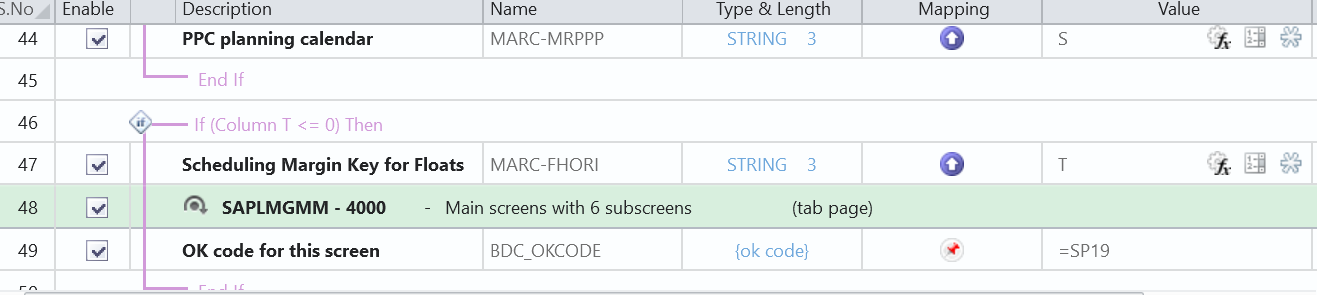
Thank you
Carol
------------------------------
Carol Biondo | Material Master FE
Mars Information Services US HQ | (908) 852-1000
------------------------------