Hi Knavis
We look at both flexibility and usability for doing something like that.
Flexibility often introduces complexity, so we look for common views. For example, finished goods and semi-finished goods often have very similar views to fill in. They might be good candidates to "group together" into one script. But they are vastly different from raw materials, which are also quite different from parts, packaging, etc.
And to me, it's more than getting the script to work for all materials you group together. It's about the person filling out the template knowing what they need to fill out and what not to fill out - there's the usability part.
So it's all about tradeoff's.
As Krista suggested, you'll only be able to know what is going wrong via DEBUG mode. Have you tried that?
Also I took a quick look at your script. You will likely need to use IF statements in Expert mode to only go to specific views based on the material type in column E. You will need to consider that if you skip a view, you might need to adjust your OK codes to got to a different screen/view number, as well.
for example, you won't want to go to the sales org data unless you sell it.
So SP04 would take you to sales area data if it's a FERT, but that view may be different for a ROH or HALB, and you may need to skip the entire set of sales views.
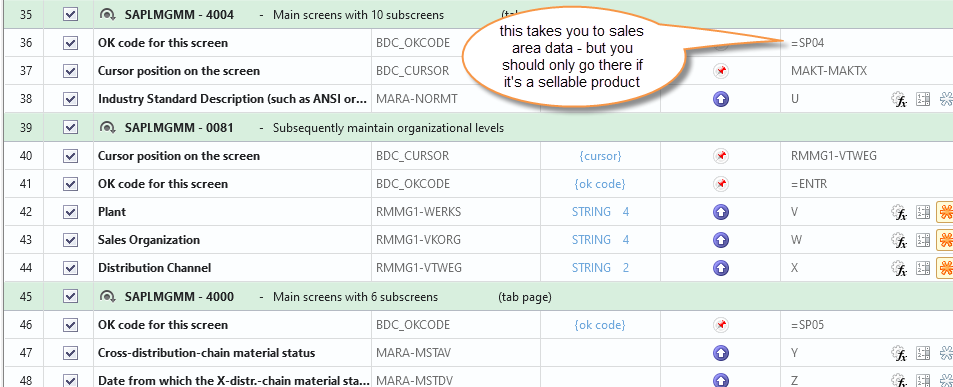
so you might need to do something like this
the first IF will take you to a different view if not a FERT - I made up the view number
the second IF will only go to sales views if it's a FERT
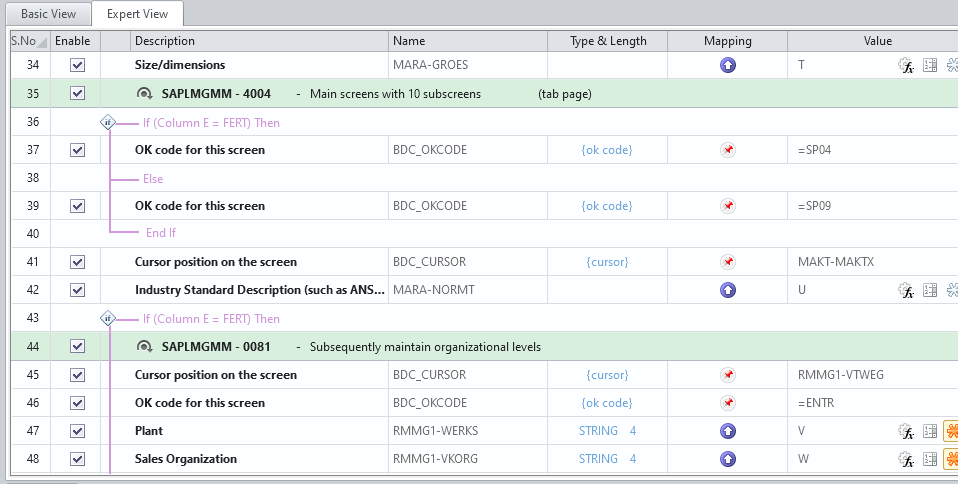
You would need to add more IF statements for all of the material types you wanted to support
You could also use a BAPI, no view numbers to worry about, but you would still need IF statements around various view data: BAPI_MATERIAL_SAVEDATA depending on the material type.
My recommendation would be to create a simple spread sheet listing material types in rows, and view names across the top. Put an X in a column if you fill in view data, and you'll easily be able to recognize patterns. If you need to group them together, group similar materials together, noting view numbers may change depending on the material type and make good use of IF statements.
Best Regards,
Sigrid
------------------------------
Sigrid Kok
PSE | Winshuttle NA
------------------------------