Automate

 View Only
  • 1.  Pop Up Screens in Transaction

    Posted 01-03-2022 18:45

    Using VK34, attempting to create a Transaction script to update Customer Item pricing.  If the new price being created overlaps an existing price condition based on Validity Dates, then a pop-up screen is to appears to confirm the new price.   Problem is the pop-up screen is a bit erratic and causing error conditions to appear in the script log even when the data is actually saved.

     Found a support entry indicating pop-ups after a save operation should not be relied upon using the "Skip  Screen if Not Present" property.   Instead, it suggested placing the pop-up in a condition statement rather than using the property.   Here is the section of my script:
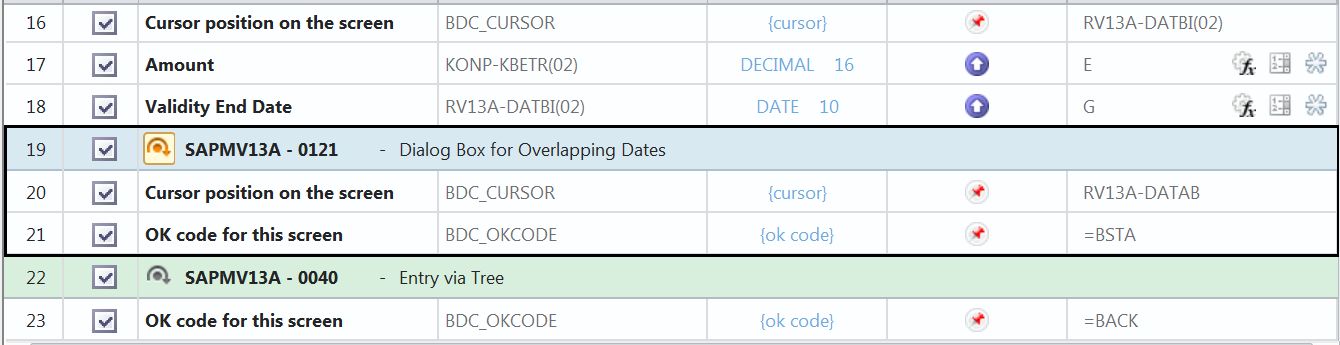
     Any suggestions for what such a condition would look like?

     Thanks, and appreciate your input.

     Dave Leon

    KIS Technologies Inc.

    Mobile:  (713) 201-0041  

    eMail: DaveLeon@Hotmail.com


    ------------------------------
    Dave Leon | SAP Winshuttle Consultant
    KIS Technologies Inc. | (713) 201-0041
    ------------------------------


  • 2.  RE: Pop Up Screens in Transaction

    Employee
    Posted 01-04-2022 13:20
    Hi Dave

    I haven't recorded VK34, but I see that it's similar to VK11, except there you have to choose an access sequence.  

    In VK11, I've had success using the skip if the pop-up isn't found at the very end, after the save (OK Code SICH).

    Would you consider trying that?

    I see in yours you're going back to the main page with the different groups in pricing, and I wonder if that is what is throwing it off.

    Hope that gives you an idea,
    Sigrid

    ------------------------------
    Sigrid Kok
    PSE | Winshuttle NA
    ------------------------------


  • 3.  RE: Pop Up Screens in Transaction

    Posted 01-04-2022 16:45
    I did eliminate the final screen where I was using =BACK to return to the initial screen.  Having done this the script then ended exactly like your VK11.  But afterwards I started getting "No batch input data for dynpro (SAPMV13A 0040 Entry via Tree) for every record.  

    The bigger problem here remains to be the pop-up  screen is unaffected by the Skip Screen if Not Present property being set to True.  It does pop up for Overlapping Dates and is handled properly with the data records being saved correctly.  However,  contrary to the property setting the pop-up appears even when no overlapping validity dates exists and produces the error message "No batch input data for dynpro (SAPMV13A 0121 Dialog Box for OverlappingDates)".  Ironically, the data is actually being saved anyway.

    Concerned that this pop-up will never work correctly since it's occuring after the save operation and as support has suggested, must be dealt with by an If condition statement.  Just don't know how to go about putting that pop-up within an If condition.  Any Ideas?

    ------------------------------
    Dave Leon | SAP Winshuttle Consultant
    KIS Technologies Inc. | (713) 201-0041
    ------------------------------


  • 4.  RE: Pop Up Screens in Transaction

    Employee
    Posted 01-05-2022 09:22
    Every tcode is different.  Please give VK11 a try, Dave, and see if it works for you.   

    Best Regards,
    Sigrid

    ------------------------------
    Sigrid Kok
    PSE | Winshuttle NA
    ------------------------------


  • 5.  RE: Pop Up Screens in Transaction

    Posted 01-05-2022 11:31
    VK11 does look like a viable alternative . . . I'll give it a try.

    ------------------------------
    Dave Leon | SAP Winshuttle Consultant
    KIS Technologies Inc. | (713) 201-0041
    ------------------------------


  • 6.  RE: Pop Up Screens in Transaction

    Posted 01-05-2022 11:47
    Hi Dave,

    I was able to get the VK34 script working by adding SAPMV13A-0040 with a script screen after the save screen: 


    Please let me know if this works for you.

    ------------------------------
    Maria Simpson | Senior Solutions Engineer
    Winshuttle North America | 4255276647
    ------------------------------


  • 7.  RE: Pop Up Screens in Transaction

    Posted 01-05-2022 14:07
    I'm scratching my head as to why such a minor change can solve such a pesty problem, but it has!  The pop-up screen is now functioning the way it is suppose to.

    Thank you for your suggestion Maria.

    ------------------------------
    Dave Leon | SAP Winshuttle Consultant
    KIS Technologies Inc. | (713) 201-0041
    ------------------------------


  • 8.  RE: Pop Up Screens in Transaction

    Posted 01-05-2022 14:42
    Great! I'm glad it worked!

    ------------------------------
    Maria Simpson | Senior Solutions Engineer
    Winshuttle North America | 4255276647
    ------------------------------