Hello Sigrid
Thank you for the reply. I did tried in SAP it is working, but when I try to do the same in Winshuttle I get the error as Material already exist.
Below is the what I did.
1. I have attached the video of my screen recorder.
2. Attached Material creation file (DATA and Excel) (Basic Data 1, 2, Sales org 1, 2, MRP 1, 2, 3,4, Sales General Data 1 and 2, Accounting 1)
3. Attached extend the same material to WM1 and WM2.
This is what I did,
1. I created the script via MM01 with Basic Data 1, 2, Sales org 1, 2, MRP 1, 2, 3,4, Sales General Data 1 and 2, Accounting 1 in my first script and I saved it.
2. Then I created another script using MM01 and selecting only WM1 and WM2.
My Requirement is to extend to WM1, WM2 and QM from initial script creation.
Script File- MM01_Extend Tab- Initial script creation for (Basic Data 1, 2, Sales org 1, 2, MRP 1, 2, 3,4, Sales General Data 1 and 2, Accounting 1)
Script File- MM01_Extend tab to WM1, 2 (WM1 and WM2)
Ashakir
------------------------------
Ashakir Akbar | SAP Program Manager
Axium Plastics, LLC | (614) 706-5955
------------------------------
Original Message:
Sent: 09-30-2021 13:45
From: Sigrid Kok
Subject: Extending the material to other MM01 tabs
Ashakir,
Here's the approach to use
- For NEW views or NEW plants/sales orgs, use MM01.
- To CHANGE data in views that already exist, use MM02.
Example 1: You created a material with MM01 for basic data and sales views. You want to add plant data - use MM01 and only choose plant tabs - new tabs.
Example 2: You want to add new plants for MRP or Plant views, use MM01
Example 3: You want to modify something in a sales tab already created, use MM02
Example 4: You want to add new sales areas, use MM01
If you try it inside SAP, you'll be able to see the behavior. Then you can automate it in Studio.
Hope that makes it clearer,
Sigrid
------------------------------
Sigrid Kok
PSE | Winshuttle NA
------------------------------
Original Message:
Sent: 09-30-2021 13:40
From: Ashakir Akbar
Subject: Extending the material to other MM01 tabs
The files I shared is just created using MM01 for initial selection. From here I need to use MM02 to extend for other tabs? For extending I should use MM02 and select the new view ( MRP's and WM's).
------------------------------
Ashakir Akbar | SAP Program Manager
Axium Plastics, LLC | (614) 706-5955
Original Message:
Sent: 09-30-2021 13:34
From: Sigrid Kok
Subject: Extending the material to other MM01 tabs
Hi Ashakir
You seem to be choosing the same views for you extension = below checkbox shows you're picking basic data and I can see the fields starting in row 17
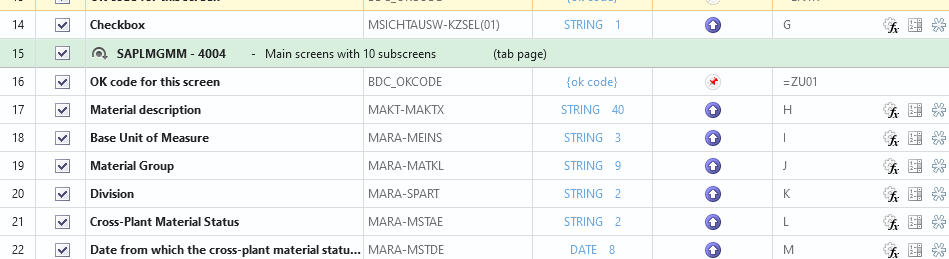
for extensions, you have to pick the new views. So you pick your warehouse views, for example, from your initial question.
You cannot use MM01 with the views you already created. You have to use MM02 to update them.
But to extend, creating new views and/or adding sales areas or plants, you use MM01.
Hope that helps clarify it.
Best Regards,
Sigrid
------------------------------
Sigrid Kok
PSE | Winshuttle NA
Original Message:
Sent: 09-30-2021 13:22
From: Ashakir Akbar
Subject: Extending the material to other MM01 tabs
Hello Sigrid
Thank you for responding. I still did not get your steps. I am attach both the data and excel for your review.
I created a script using MM01 for Basic data 1, 2 and Sales Org 1 and 2. As per your direction if I do it it is throwing me an error as material already exist and if I try in MM02 I cannot see the other tabs to extend.
------------------------------
Ashakir Akbar | SAP Program Manager
Axium Plastics, LLC | (614) 706-5955
Original Message:
Sent: 09-30-2021 08:40
From: Sigrid Kok
Subject: Extending the material to other MM01 tabs
Hi Ashakir
You would record it in the same way as you recorded the original MM01 creation.
Use MM01 to extend
- upload your material number
- ensure you clear default views as part of the recording
- select the view you want to start with
- and then record the fields and the screens you want to use in your extension
Best Regards,
Sigrid
------------------------------
Sigrid Kok
PSE | Winshuttle NA