Hi Pedro
Thanks for sharing. We don't have the Function Module method available for QP0#.
Also, we don't work with the graphical editor (looks like a word processor) except via gui scripting.
You can swap to the line editor
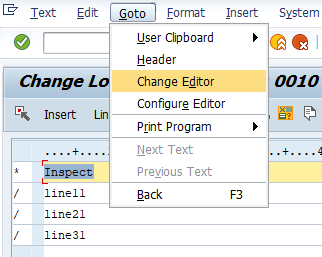
then use LINE to insert rows - 72 characters at a time.

Some of the tips for long text are here in the documentation:
https://docs.winshuttle.com/studio-en-12-1-x-online-help-studio-w-connect/12/Record-long-text.htm Best Regards,
Sigrid
------------------------------
Sigrid Kok
PSE | Winshuttle NA
------------------------------
Original Message:
Sent: 08-02-2021 12:38
From: PEDRO FERREIRA
Subject: Descriptive Text Script
Hi Sigrid,
It follow attached.
thak you for your help.
att,
Pedro Ferreira
------------------------------
PEDRO FERREIRA | MASTER DATA SPECIALIST
Bemis Co., Inc. | 43984843398
------------------------------
Original Message:
Sent: 08-02-2021 08:49
From: Sigrid Kok
Subject: Descriptive Text Script
Hi Pedro
In general, the line editor is the best option, but depending on the tcode, there is an easier option via the Winshuttle Function Module, where you can choose to add long text in Studio. Can you please share the tcode? I know it's plant maintenance, but unsure about the exact transaction.
Best Regards,
Sigrid
------------------------------
Sigrid Kok
PSE | Winshuttle NA