Automate

 View Only
  • 1.  Please enter a valid Date

    Posted 07-01-2021 07:11

    Hi Community, i'm new here, and as well in winshuttle. Im not that experienced guy. So please forgive me if i'm asking sometimes stupid questions :)

    At the moment im trying to get my FB50 transaktion running, and in debug mode it works more or less, but when running i get the message please enter a valid date. The date is valid as far as i can see. im desperated and i ran the script now felt like 100 times in debug, but i didn't get the clue whats wrong in my script. Any idea what i have done wrong or could be the reason. I attach the script and hope someone can tell me what im searching for :)

    Thx in advance
    Matthias


    ------------------------------
    Matthias Lautenschlaeger | PLM Assistant
    GSI Helmholtzzentrum für Schwerionenforschung GmbH | +49 6151 71xxxx
    ------------------------------

    Attachment(s)

    xlsx
    FB50_KST.xlsx   153 KB 1 version
    Txr
    FB50_KST.Txr   531 KB 1 version


  • 2.  RE: Please enter a valid Date

    Employee
    Posted 07-01-2021 10:05
      |   view attached
    Hi Matthias

    Nice job on the initial script with the loop!

    For that message, I believe you're missing document date, which is also required.  Posting date defaults, but document date does not - at least in my system.

    It's in the recording but not "enabled" so that you can map it.  
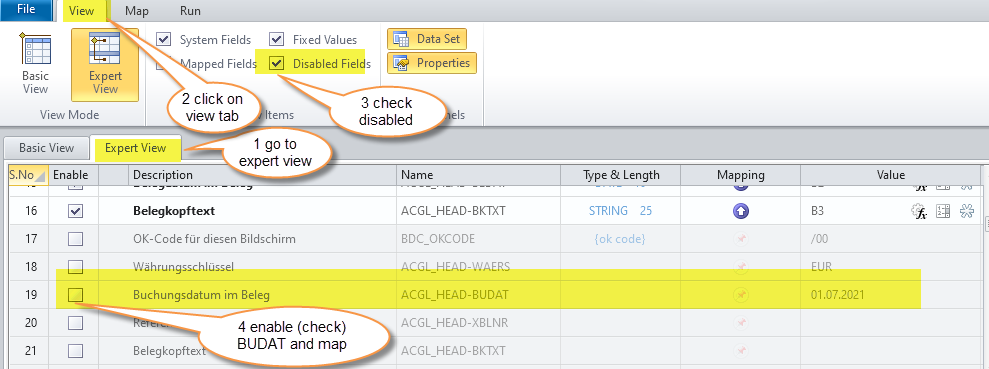
    However, you are trying to swap company code prior to entering the dates, and SAP gets mad about that and throws an error.  So I suggest you enter the dates first, then swap company codes

    One other thing to consider for this tcode.  There are settings in FB50 that could cause a pop-up for company code when the tcode starts.  

    some users may have this option checked
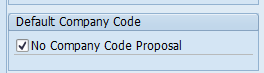
    it causes this pop-up at the start of the tcode
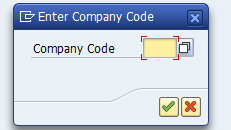
    this can affect others running the script successfully.  

    Best practice is to record with the pop-up and then use a skip if not found property to ignore the pop-up in the script if it doesn't happen.  So I modified your script:
    1. I added the pop-up with skip if not present checked, mapping to the same company field
    2. I reordered the first part - entering both posting and document dates after the pop, then clicking company code to swap company codes 

    Modifications made to your script attached.  Please be sure to map document date to where you want to it go, next to posting date.

    Hope this makes sense.

    Best Regards,
    Sigrid

    ------------------------------
    Sigrid Kok
    PSE | Winshuttle NA
    ------------------------------

    Attachment(s)

    Txr
    FB50_KST.Txr   534 KB 1 version


  • 3.  RE: Please enter a valid Date

    Posted 07-05-2021 04:57

    Hi dear Sigrid, you're genius. I didn't realized it was amissing Date. Ich checked the script several times, but could not figure the real issue. Seems im blind to see the obvious problem. The script now works like a charm. As is skipped the screen for the company code if not present, always the last company code was choosen to put in the data, no matter what company code was written in the template 0030 / 0090. 
    The hint was that checkbox,

    im not into that FB Transaktions, usual im in PM but was interested to solve that issue with the loop, but failed at the end in the pop-up :)

    Thank you so much for that quick response and the adjusted template.

    Greetings Matthias


    ------------------------------
    Matthias Lautenschlaeger | PLM Assistant
    GSI Helmholtzzentrum für Schwerionenforschung GmbH | +49 6151 71 xxxx
    ------------------------------


  • 4.  RE: Please enter a valid Date

    Employee
    Posted 07-07-2021 11:22
    Hi Matthias
    No worries.  I'm glad it works.  
    Best Regards,
    Sigrid

    ------------------------------
    Sigrid Kok
    PSE | Winshuttle NA
    ------------------------------