Hi Krista
What kind of validation rules are you trying to apply? And how are you trying to apply them?
It's usually best to apply them as the data is being entered, i.e. when it changes. And for some, it's automatic - required, email data type will show bad formatting, if numeric and you enter alpha it will catch it, etc.
I have rules in a repeating table, as well as the excel upload options, and I also turned on the enable validation results

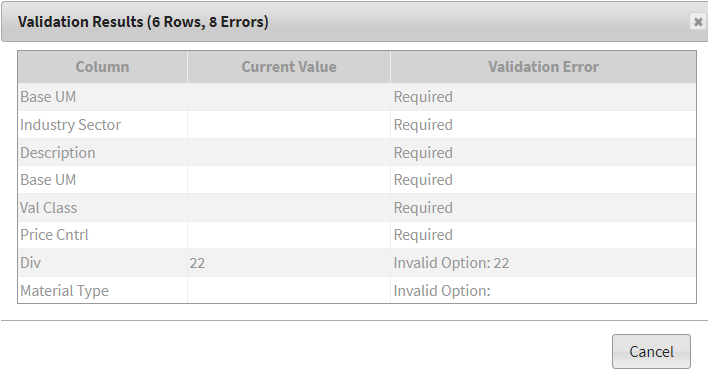
Since I am applying the rules as the values change, I enter data and/or upload data, it will show how many issues you have, if any, as well as what they are in a pop-up. This is especially helpful when you have pagination on.
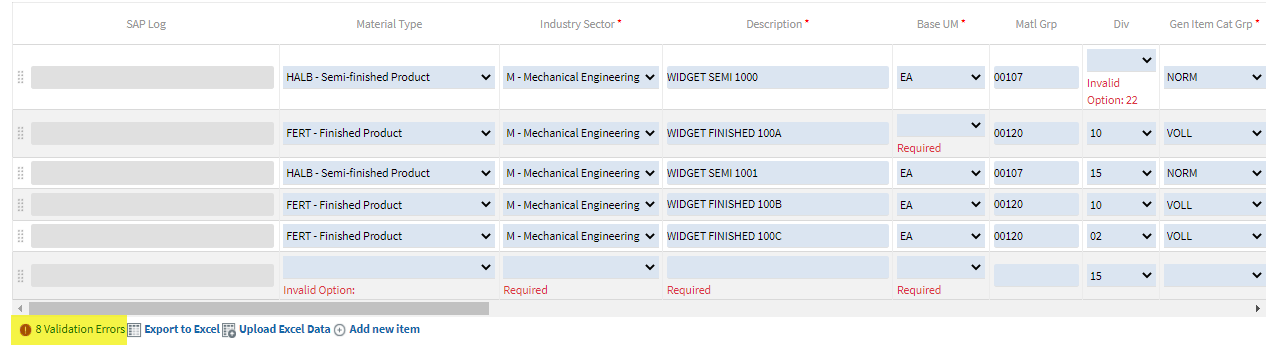
validation pop-up - if I had multiple pages, it would give me a page number. If I click on it, it would take me to that page
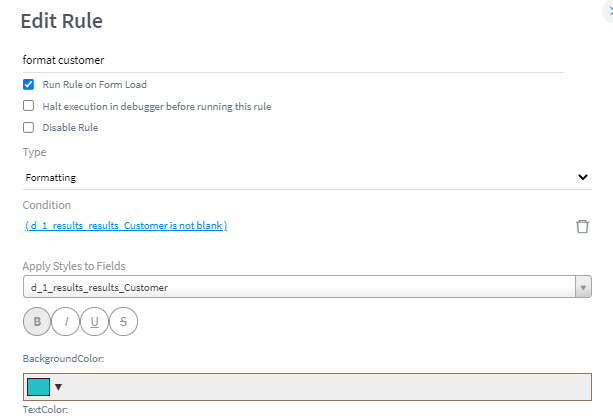
You can also highlight errors by using a formatting rule. Depending on when you want to highlight the field, you can specify run on load.
The below example is if it's not blank, but you can use other conditions depending on what you're checking.
Hope that gives you some ideas. If you can share more specifics on what you're trying to do and when, and we may have other ideas.
Best Regards,
Sigrid
PS: Thanks, Vanessa, for jumping in to help as well!
------------------------------
Sigrid Kok
PSE | Winshuttle NA
------------------------------