Automate

 View Only
  • 1.  Chained Scripts

    Posted 05-18-2021 06:25
    Hello,

    when using chained scripts, is it possible to use an if condition referring/testing a column of another?

    Meaning, in the second script I need to create an if condition based on a column which is in the first script, but it's not working.

    Thanks for the support.

    BR
    João Rino

    ------------------------------
    joao.rino |
    SIEMENS SA (GSS A&F CENTER Lisbon) |
    ------------------------------


  • 2.  RE: Chained Scripts

    Posted 05-19-2021 02:33
    Hi João,

    are you using the same Excelfile in both scripts?

    KR
    Jan

    ------------------------------
    Jan van Asseldonk | Consultant
    CTAC | +31629078169
    ------------------------------


  • 3.  RE: Chained Scripts

    Employee
    Posted 05-19-2021 09:37
    Hi Joao

    The easiest way is to use Excel formulas to pull the values into the same sheet.  

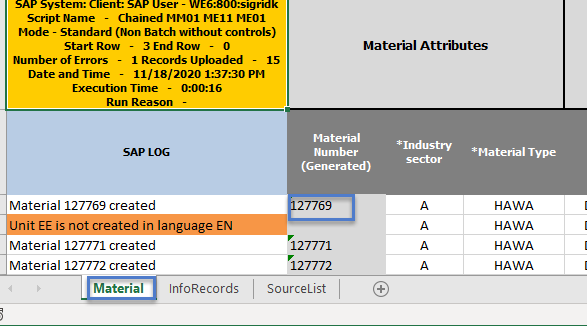
    Here's an example of create material, then create PIRs and Source Lists, all chained.

    In the Material sheet, I have a generated material number.
    In the InfoRecords sheet, I use an Excel Formula to pull in the material number:  =Material!B3   that's:  Sheetname!Cell
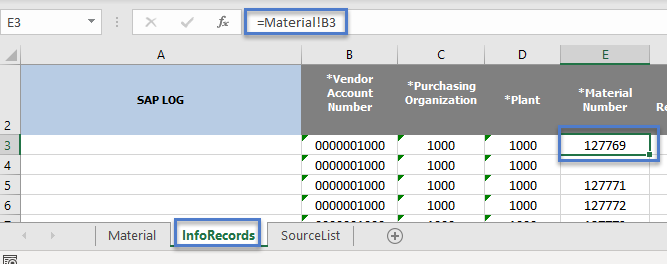
    Then I can use an IF in the script, if Column E is blank, skip it.

    Will that work for your use case?

    Best Regards,
    Sigrid

    ------------------------------
    Sigrid Kok
    PSE | Winshuttle NA
    ------------------------------


  • 4.  RE: Chained Scripts

    Posted 05-19-2021 09:46

    Hello,

    It worked, my problem was that in the first script the value was only in one cell. And in the second one, since I have a loop, the if condition analyses the "if column" but it didn´t have any value to check. So I had to replicate the value any time I have another line.

    My question then is: Is it possible to make a if condition based on a specific cell, instead of column, like D3?

    Many thanks for the support.

    Joao


    ------------------------------
    joao.rino |
    SIEMENS SA (GSS A&F CENTER Lisbon) |
    ------------------------------


  • 5.  RE: Chained Scripts

    Employee
    Posted 05-19-2021 09:53
    Hi Joao

    It may work with cell-based mapping in a header field, but not with column-based mapping or in a line items section.

    For a static value, you can alter the formula:  =Material!$B$3    It will always pull a value from the Material sheet cell B3.

    If you can share your use case, we may be able to come up with other suggestions.  A brief explanation and screen shot will do.

    Best Regards,
    Sigrid

    ------------------------------
    Sigrid Kok
    PSE | Winshuttle NA
    ------------------------------