Hi Krista
Repeating scripts must be mapped so that all fields related to that script are in the same repeating group. You cannot have some fields mapped to one repeating group and some mapped to another.
When I click on material number in your characteristic table, it's pointing to a material number in a different repeating group for the base material create. That's why if you add a material in the main material table, it's added to the characteristics and vice versa.
You'll want to remap the material number for the characteristics to the material number field in that repeating group
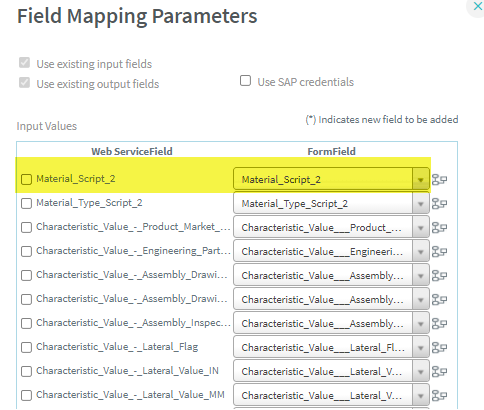
then you can use a copy table rule to copy the material number from the main material create table to the characteristic table
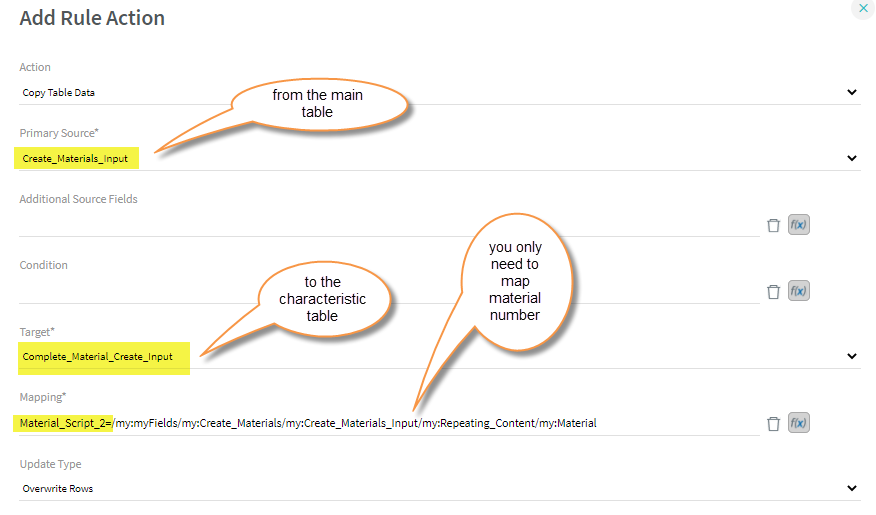
You'll only want to do this one time after you've determined which materials you will create, since it will overwrite any values you have in the target table.
You can decide when to trigger it and how, such as using it on form load when the characteristics have to be entered or via a button.
Hope that helps,
Sigrid
------------------------------
Sigrid Kok
PSE | Winshuttle NA
------------------------------
Original Message:
Sent: 05-18-2021 09:44
From: Krista Zinna
Subject: Repeating Table copying data in new rows
Ok, let me try again. I'm sorry for the confusion!
------------------------------
Krista Zinna | Master Data Specialist
Timken Company |
------------------------------
Original Message:
Sent: 05-18-2021 09:38
From: Sigrid Kok
Subject: Repeating Table copying data in new rows
Hi Krista
The zip file contains a shortcut. :) Can you please try again?
Thanks,
Sigrid
------------------------------
Sigrid Kok
PSE | Winshuttle NA
Original Message:
Sent: 05-18-2021 07:37
From: Krista Zinna
Subject: Repeating Table copying data in new rows
Hi Sigrid - So all of the tables starting under the group titled "Engineering" (Engineering/Supply Chain Data/Nomenclature) will repeat ALL of the fields in the tables. Here is my file attached as a zip file. I really appreciate your help!
Krista
------------------------------
Krista Zinna | Master Data Specialist
Timken Company |
Original Message:
Sent: 05-17-2021 17:15
From: Sigrid Kok
Subject: Repeating Table copying data in new rows
Hi Krista
Thanks for responding to my questions.
I think you can zip up the solution and attach it, as long as it's not huge.
As to the behavior, I'm still a little fuzzy. I have more questions, but overall I need you to provide more detailed steps and expected behavior. Which specific entry is causing the duplication of data - in which group? The supply chain group?
Best Regards,
Sigrid
------------------------------
Sigrid Kok
PSE | Winshuttle NA
Original Message:
Sent: 05-17-2021 15:54
From: Krista Zinna
Subject: Repeating Table copying data in new rows
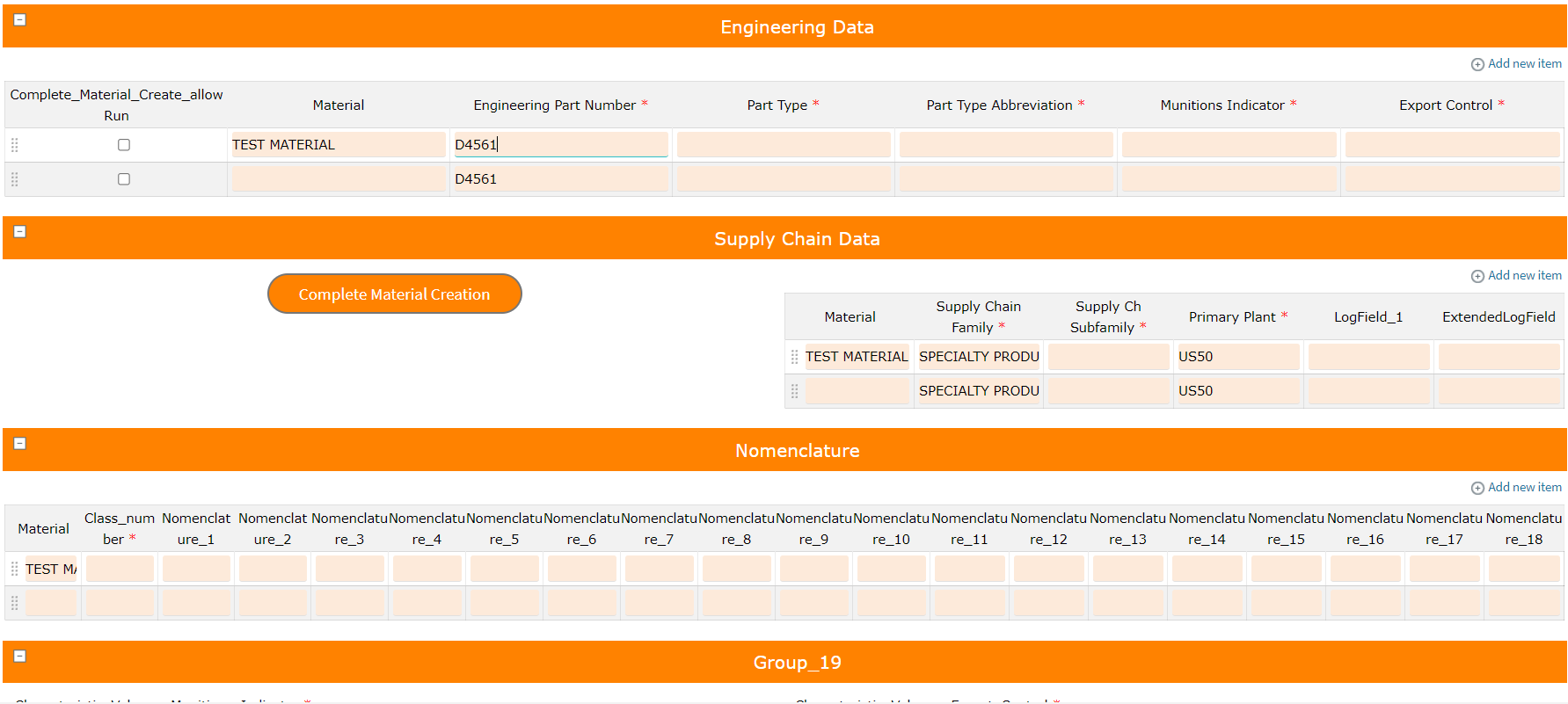
Thanks for the reply Sigrid! I've attached a few screenshots for you to view. I tried to attached my solution but it said that wzip files are not supported. Is there a different way I can share my solution with you? Here is a screenshot of my tables from Script 1, and you can see that the values I enter into for the first material do not copy into the fields for the second line (material).

But in the tables for my second script, when I type in data for the first line (material), it copies into the data fields for the second line. I do not want this to occur. Attached is my solution. Thank you for your help!
------------------------------
Krista Zinna | Master Data Specialist
Timken Company | 234-262-2008
Original Message:
Sent: 05-17-2021 14:31
From: Sigrid Kok
Subject: Repeating Table copying data in new rows
Hi Krista
Congrats on working on an Evolve solution! It's fast and mostly easy, but it does take some practice.
I am not 100% sure I understand the issue: "The problem is that the Repeating table for Script 2 is copying down values for every field/column when data is entered" What do you mean by copying down values?
I might suspect mapping if there any issues. When you imported the 2nd script, did you generate new fields or did you re-use input fields from the first one? I.e. are you trying to share fields across the scripts or are they completely separate?
It might help if you include some screen shots on what is happening and perhaps attach your solution.
Best Regards,
Sigrid
------------------------------
Sigrid Kok
PSE | Winshuttle NA