Hi Rob
Got it. So what you experience in Studio is not fully Excel - it's a 3rd party product, so there may be differences. I was able to reproduce your issue, and no, I was not suggesting the runner reformat each time - I thought it would "stick", but it does not.
Here's another approach I just tested - I'm using a standard table - MARA with gross and net weight, which is output with decimal points.
Use an Excel Conditional Formatting rule - and remove your formulas in the Query mapper.
I'm applying the Excel conditional formatting rule to all of column D and E (you see the results of this rule in the excel part of this screen shot)
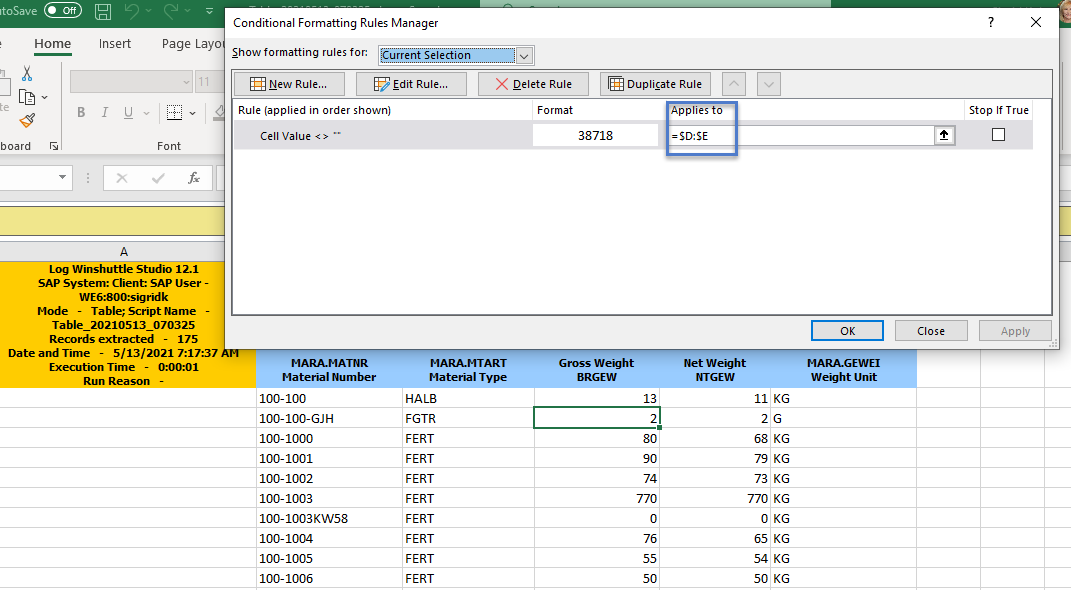
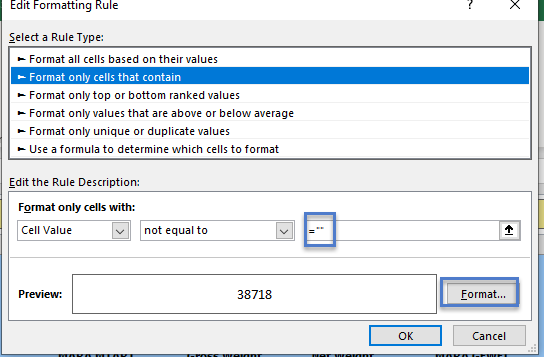
If the value is not blank - when you first create the rule, Excel will add double quotes, so I had to go back in and ensure it was just "" not """"""
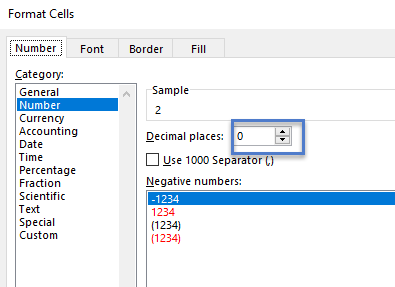
format the number to have 0 decimal places
I've tried this out in Excel, and it works after publishing the script.
Hope that this helps you out.
Sigrid
------------------------------
Sigrid Kok
PSE | Winshuttle NA
------------------------------
Original Message:
Sent: 05-13-2021 10:03
From: Krishna Cheguri
Subject: Tranformation Rule
Sigrid - Tried to change the format to General, but it is overwriting to Number..
Robert - Can you have another sheet in excel with the same fields where you can apply formula to remove zeros and the user can use that sheet. Not sure if this is a feasible solution. Will look for other replies too..
------------------------------
Krishna
------------------------------
Original Message:
Sent: 05-13-2021 09:57
From: Robert Preston
Subject: Tranformation Rule
Hi,
That was the point I was trying to make. I formatted the columns and saved and the data is ok but when you run the query again it overwrites them and makes them decimals again. Also, I do not understand why it works ok in the actual query but fails when its published to excel.
I really do not want the user to have to remember to format the columns to change the data after every extract.
Thanks
Rob
------------------------------
Robert Preston | SAP Logistics
Tenneco | +447921466774
Original Message:
Sent: 05-13-2021 09:46
From: Sigrid Kok
Subject: Tranformation Rule
Hi Jay
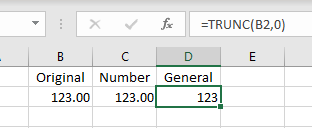
Please check the format of the columns you are trying to transform. It's likely they have changed to number, which defaults to 2 decimal places - no matter what formula you apply.
I applied the same TRUNC formula to both column C and D.
HTH
Sigrid
------------------------------
Sigrid Kok
PSE | Winshuttle NA