Hello Jac
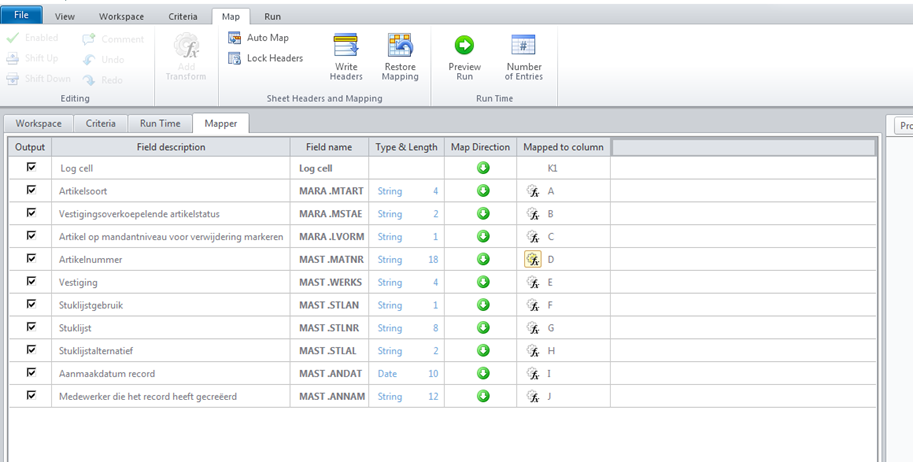
I had updated my original reply last week. Unfortunately, Studio 11 does not support sorting, and it is EOL.
I recommend you upgrade to version 12.1, along with the upgrading the Winshuttle Function Module, which does support sorting.
If you cannot, you can output your data to an Excel table and sort after the data has been extracted.
Best Regards,
Sigrid
------------------------------
Sigrid Kok
PSE | Winshuttle NA
------------------------------
Original Message:
Sent: 05-11-2021 02:37
From: Jac Verbaten
Subject: Sort data in Winshuttle query
Hi Sigrid
Last week I sent a message via the button Reply to Sender. Only I have not yet received a message about this, so try this way.
In the mapper my last column is Mapped to column (see image)
I have Winshuttle version 11, this may be the problem or something is wrong in my settings.
| Kind regards,
Jac Verbaten
The Greenery B.V.
T +31 180 656 948, M +31 650 214 718
Spoorwegemplacement 1, 2991 VT Barendrecht, the Netherlands
Follow us on Linkedin | Facebook | YouTube |  |
| View the dynamics of our value chain at www.thegreenery.com |
|
| Registered office in Barendrecht | Part of The Greenery  |
Original Message:
Sent: 5/6/2021 10:39:00 AM
From: Sigrid Kok
Subject: RE: Sort data in Winshuttle query
Hi Jac
There is a sorting column in the MAP tab in version 12.x.
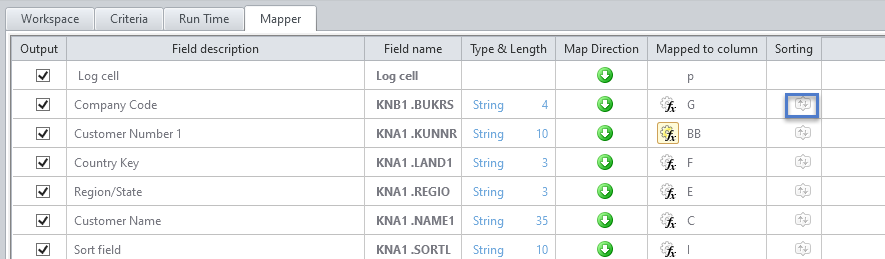

If you don't/can't upgrade (Please note that v11 is EOL.), create an Excel table and direct the Query output to those table columns. You can use Excel sorting of the output.
Hope that helps,
Sigrid
------------------------------
Sigrid Kok
PSE | Winshuttle NA
------------------------------