Hi Robert,
Unless you're having issues with the data loading properly, please don't let that throw you. Most of the time in SAP with grids, when you go to the next page full of entries, the "index", i.e. 01, 02, etc, reset.
Here's an example in customer master where I have 7 tax classes. I can enter the first 6 on the first screen full, and then the 7th on the next. This is what I see in Studio
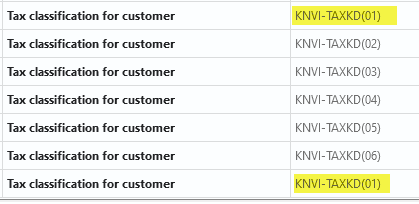
Notice two are (01), which is what SAP does in tcodes in grids as you paginate.
HTH
Sigrid
------------------------------
Sigrid Kok
PSE | Winshuttle NA
------------------------------
Original Message:
Sent: 05-06-2021 13:39
From: Robert Preston
Subject: Loop on Horizontal spread sheet
One more question and I promise to leave you alone. When you record in VA32 unlike the normal manual entry screen there are only 3 lines visible on the forecast lines screen and to add more than 3 lines I used the + icon. When I look at the recording the item fields names only go up to 03 and the rest where I pressed the + button are named ending 02, could this cause an issue with mappings as the field names are duplicated, see attached.
------------------------------
Robert Preston | SAP Logistics
Tenneco |
------------------------------
Original Message:
Sent: 05-06-2021 13:19
From: Sigrid Kok
Subject: Loop on Horizontal spread sheet
Glad it worked, Robert!
I'm constantly learning ways tcodes behave and ways we can automate them, and I've been doing this for a number of years now. Often it is straightforward, but sometimes not so much. It makes it fun & challenging at the same time.
IF statements can be your friend when there is variability in either your data or SAP.
Best Regards,
Sigrid
------------------------------
Sigrid Kok
PSE | Winshuttle NA
Original Message:
Sent: 05-06-2021 13:02
From: Robert Preston
Subject: Loop on Horizontal spread sheet
Hi, perfect thanks that worked, I am not used to the concept of the script carrying on when there is are values to populate but get it now. :)
Regards
Rob
------------------------------
Robert Preston | SAP Logistics
Tenneco |
Original Message:
Sent: 05-06-2021 12:21
From: Sigrid Kok
Subject: Loop on Horizontal spread sheet
Hi Robert
You would use IF logic similar to this
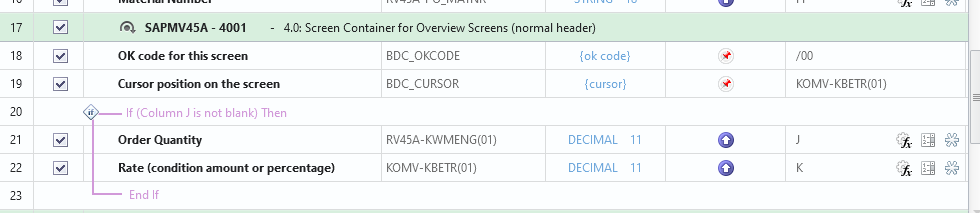 This is for updating a sales order, but the same logic applies. You see Order qty mapped to J and Rate mapped to K
This IF says, if J is not blank, i.e. quantity is not blank, upload quantity and rate, otherwise it skips it and doesn't upload anything for that row.
You can do the same for your scheduling agreement forecast.
HTH
Sigrid
------------------------------
Sigrid Kok
PSE | Winshuttle NA
Original Message:
Sent: 05-06-2021 12:07
From: Robert Preston
Subject: Loop on Horizontal spread sheet
Hi,
I have watched the training video and read the documentation.
I was able to record and map as suggested and all runs ok. The problem is I cannot get the syntax on the IF correct, I have tried both column and SAP field = blank but it will not work if the field is blank, how do I get to 'END'.
I would have thought it would be something like
"IF XXXXX (SAP field or column) is blank END, ELSE run script for the next set of values and repeat the above.
Any help would be appreciated.
Regards
Rob
------------------------------
Robert Preston | SAP Logistics
Tenneco | +447921466774
Original Message:
Sent: 05-05-2021 16:39
From: Jennifer Hwang
Subject: Loop on Horizontal spread sheet
Hi Rob -
Here is a recorded WUGinar: https://www.winshuttle.com/assets/webinar-manage-complexity-in-sap-with-ease-through-mastering-if-conditions/
This is a link to our documentation: If conditions
There is also a section in this training on If conditions: https://www.winshuttle.com/assets/training-video-winshuttle-champion-kit-training-demo-live-qa/
You can also access eLearning on this Community site.
Thank you!
------------------------------
Jennifer Hwang | SE
Winshuttle North America
Original Message:
Sent: 05-05-2021 11:57
From: Robert Preston
Subject: Loop on Horizontal spread sheet
Hi, thanks for the reply, I am new to Winshuttle so could you point me to any documentation on adding 'IF' into statements into scripts.
Regards
Rob
------------------------------
Robert Preston | SAP Logistics
Tenneco | +447921466774
Original Message:
Sent: 05-05-2021 10:56
From: Jennifer Hwang
Subject: Loop on Horizontal spread sheet
Hi Rob -
So the simple answer is that this would not be a looped transaction. Essentially, you would need to record putting in X sets of schedule lines, assuming a certain max that you may get, and each set of fields would be mapped to its own unique set of columns. You could put in IF conditions so that if for example your recording had 10 potential sets of lines, but you typically have 3 minimum, then perhaps starting with set 4, you would put IF conditions around those lines in the script it so that it only enters it if there is data in the appropriate column.
This is a perfectly legitimate way to use Winshuttle without looping.
Thanks!
------------------------------
Jennifer Hwang | SE
Winshuttle North America