Hi again Manoj
I have not used a bapi for price updates. There is one with a blog, but it looks quite like it will require extra work to get all of the inputs they way this blog describes:
https://blogs.sap.com/2014/07/14/document-for-bapi-bapipricesconditions/Vanessa is correct. You have the screen name of the last section inside your loop - it needs to be adjusted to look like this:
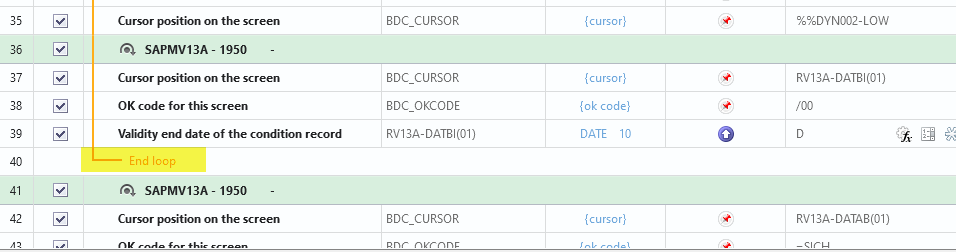
If you want to stick with VK12 transaction, on the initial screen I would suggest you use a wide range of material numbers or at the very least sales org and distribution channel, so that you limit how many you're trying to process at one time. SAP took about 15 seconds to list all materials for a sales org/dist channel and that was under 4000.
I ended up with a bit over 500 materials in a loop, and I used the sales org, dist channel and a range from the lowest to highest material number, and it ran in about 23 seconds.
With the same number of conditions to update, only specifying sales org and dist channel, it ran in about 30 seconds. But again, I only have about 4000 condition records.
IDK how many you have to process, but specifying more criteria to limit the number you are processing and breaking it into chunks will be your best bet - even if you get the BAPI working. It will also prevent locking all of those conditions. My 2 cents. :)
Best Regards,
Sigrid
------------------------------
Sigrid Kok
PSE | Winshuttle NA
------------------------------
Original Message:
Sent: 04-21-2021 05:32
From: Manoj Adhikari
Subject: VK12 Loop with VK12 issue
Hi Sigrid,
Thank you for the response. I tried the method, but i think having almost xxxxxx digit line level items in the pricelist record, i will have to put material in the either in the initial selection screen of the condition or as mass copy paste. That put me in a bit difficult position again. I tried to run without any materials, but it seems like it takes forever to load as it seems to run the whole pricelist.
Any suggestions with the method of BAPI ?
Or can you maybe share your template ?
BR,
Manoj
------------------------------
Manoj Adhikari | Pricing Analyst
Metso Oy | +358440526010
------------------------------
Original Message:
Sent: 04-20-2021 09:58
From: s kok
Subject: VK12 Loop with VK12 issue
Hi Manoj
You'll want to use FIND logic at the top of the loop.
You can click on the binoculars, then enter the material number and click the OK button. (Note the filter button works the same but then you'll have to undo the filter each time.)
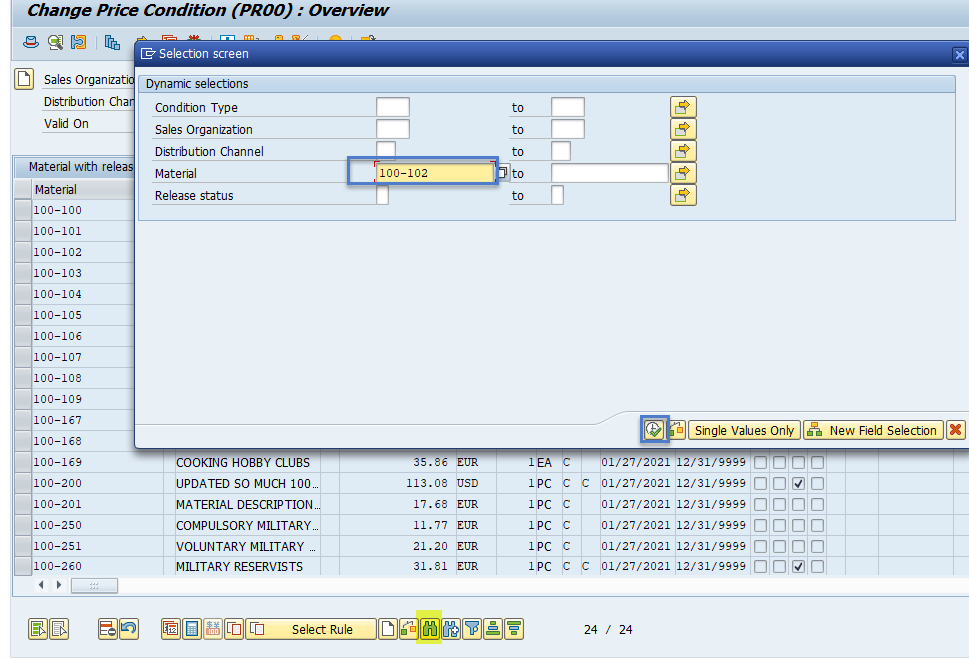
This will move your material to the top row.
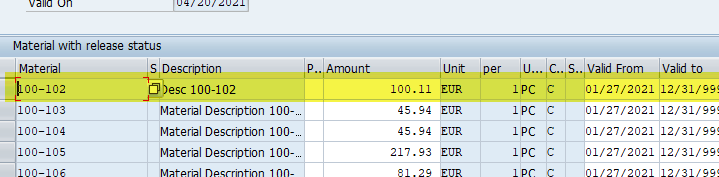
Make your changes on the top row for the 1 material.
Put a loop around those steps, and you should be good to go.
Best Regards,
Sigrid
------------------------------
Sigrid Kok
PSE | Winshuttle NA