Hi Hannah Mae
Scripts can definitely load more than one material.
It's always helpful to run in DEBUG mode and watch what is happening.
At first glance based on the message, it looks like you're adding a material class. If so, the first time, which means the first material, it will prompt you for the class type:
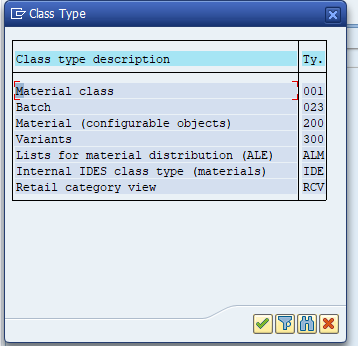
After the first material, it will assume it's the same class type and you won't be prompted. If you open up SAP and go through MM01 twice, you'll see this is the behavior.
If you swap to Expert mode, you will see something like the highlighted section

Highlight those lines and click to add an IF statement - choose if first transaction
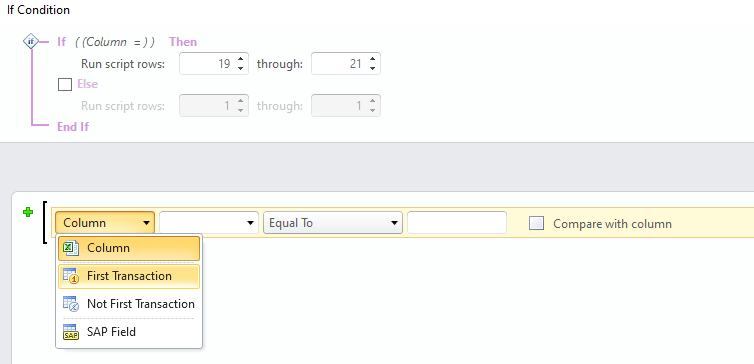
It will now look something like this
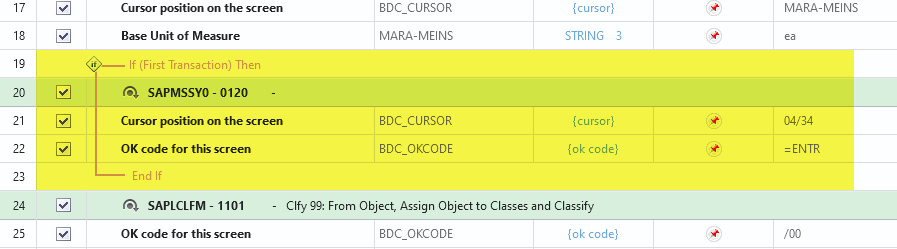
We have these IF types - If First and If Not First because in some tcodes, SAP will go through a different set of steps after the first one.
Please give it a try. If this isn't the issue, it would be helpful if you attached your script.
Best Regards,
Sigrid
------------------------------
Sigrid Kok
PSE | Winshuttle NA
------------------------------