So sorry P-Y.
I didn't fully test it. Boo.
To make it up to you, here's how to get it to work. And I google searched this using something I found here:
https://www.freecodecamp.org/news/three-ways-to-title-case-a-sentence-in-javascript-676a9175eb27/but instead of passing in a value and returning a value, I'm passing in the field xpath and using $form.getValue and $form.setValue in the javascript to get and set the field value
In the Javascript section on the Solutions tab, create a function like this:
function titleCase(inputfield) { var fieldvalue = $form.getValue(inputfield); fieldvalue = fieldvalue.toLowerCase().split(' ') for (var i = 0; i < fieldvalue.length; i++) { fieldvalue[i] = fieldvalue[i].charAt(0).toUpperCase() + fieldvalue[i].slice(1); } $form.setValue(inputfield,fieldvalue.join(' ')); }What it's doing - to the best of my knowledge:
- The xpath of the field you want to translate to mixed case is passed in, with single quotes around it as inputfield, ex: '/myfieldxpathgoeshere'
- We do a $form.getValue to get the current value of the form field and set it to fieldvalue
- Using Javascript functions, the string is broken up into an array of words, splitting up the sentence into individual words when it hits a space, as well as translating everything to lower case to start with
- It then loops via a FOR loop through each word, taking the first character and translating to upper case, and then appending the rest of the word, which is already in lower case
- Outside of the loop at the end, we use a $form.setValue call to set the form field to the join of all of the words, with a space in between
Then setup a custom rule on the field you want in mixed case, and pass in the xpath of that field with single quotes around it:
titleCase('/myfieldxpathgoeshere');
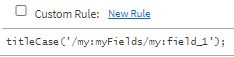
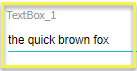
then this before
looks like this after
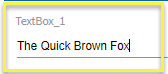
I checked and the form XML shows mixed case.

Sorry again about getting your hopes up. Mine were up, too.
Hope this helps!
Sigrid
------------------------------
Sigrid Kok
PSE | Winshuttle NA
------------------------------
Original Message:
Sent: 04-14-2021 17:28
From: P-Y Robert
Subject: Winshuttle Composer: implement toTitleCase
I'm sorry I think it works but only visually.
You will indeed see "Quick Brown Fox Jumps Over The Lazy Dog" on your form.
But in the forms XML schema, the data will be the way you typed it in.
So Composer will actually try to push "quick brown fox jumps over the lazy dog" to SAP if you typed it without holding the Shift key
Would you know what I should search for the Javascript option?
------------------------------
P-Y Robert | Senior Analyst – Collaboration Applications
Domtar Inc. |
------------------------------
Original Message:
Sent: 04-12-2021 11:45
From: s kok
Subject: Winshuttle Composer: implement toTitleCase
Yay - glad it's working for you P-Y!
I took the path of least resistance, which means CSS. I'm no expert. I found it in a Google search. :)
Best Regards,
Sigrid
------------------------------
Sigrid Kok
PSE | Winshuttle NA
Original Message:
Sent: 04-12-2021 11:21
From: P-Y Robert
Subject: Winshuttle Composer: implement toTitleCase
Thanks a lot Sigrid, it works perfectly!
I'm pretty good with Composer but CSS/Javascript aren't really my speciality, but now I know how easy it is for CSSs. It can even replace many of my rules.
Thanks! : )
------------------------------
P-Y Robert | Senior Analyst – Collaboration Applications
Domtar Inc. | 514 848 5864
Original Message:
Sent: 04-12-2021 10:43
From: s kok
Subject: Winshuttle Composer: implement toTitleCase
Hi P-Y
Would you consider CSS? You can use something like this
.textmc { text-transform:capitalize;}
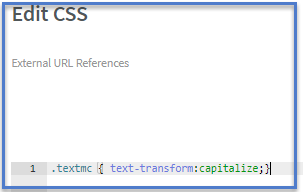
Match that up with the Class name setting on the field you want in mixed case

as you type, it will always be mixed case. I didn't use a shift key as I typed it.
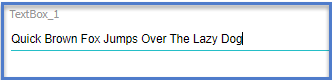
I tested this in Evolve, but it should also work in Foundation. Another option is to use Javascript, but this is much easier.
Best Regards,
Sigrid
------------------------------
Sigrid Kok
PSE | Winshuttle NA