Automate

 View Only
  • 1.  Need Script to Mass Change Project User Status

    Posted 04-09-2021 13:28

    Hi Winshuttle Open Forum Community Members,


    Does anyone have a Winshuttle script that will allow me to mass change the project User Status field?

    I have tried unsuccessfully to create a CJ02 script so I am now reaching out to all of you wonderful developers.

    I appreciate if you could forward me a working script.


    Thank you,


    Emma Norihiro

    Enterprise Financial Solutions | emma.norihiro@warnerbros.com


  • 2.  RE: Need Script to Mass Change Project User Status

    Employee
    Posted 04-12-2021 11:56
    HI Emma

    I just tried this in CJ20, and it worked.  I used standard recording mode, but it was non-batch with controls.

    1. Go to your project header
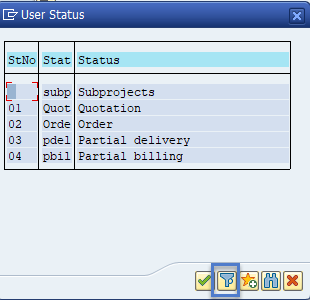
    2. Click  Edit - Status - Set Status
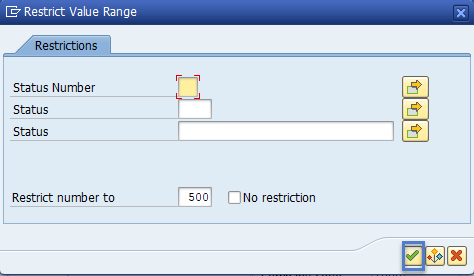
    3. Click on the filter button

    4. then enter either the number or code and click the green checkbox

    5. You may also have to click thru a message pop-up.  
    6. Then save

    BTW it works fine in CJ02, as well.

    Hope that helps,
    Sigrid

    ------------------------------
    Sigrid Kok
    PSE | Winshuttle NA
    ------------------------------


  • 3.  RE: Need Script to Mass Change Project User Status

    Posted 04-12-2021 12:29

    Thank you Sigrid.  I will get it a try.  Much Appreciated ��


    Thank you,


    Emma Norihiro

    Enterprise Financial Solutions | emma.norihiro@warnerbros.com


  • 4.  RE: Need Script to Mass Change Project User Status

    Posted 04-13-2021 12:03

    Hi Sigrid,


    I was able to create a script based on your tip that successfully changed the User Status.

    Thank you so much.  I really appreciate your help. 


    Thank you,


    Emma Norihiro

    Enterprise Financial Solutions | emma.norihiro@warnerbros.com


  • 5.  RE: Need Script to Mass Change Project User Status

    Employee
    Posted 04-13-2021 12:06
    Thanks great news, Emma!  Thanks for letting us know!

    Best Regards,
    Sigrid

    ------------------------------
    Sigrid Kok
    PSE | Winshuttle NA
    ------------------------------


  • 6.  RE: Need Script to Mass Change Project User Status

    Posted 04-13-2021 19:48

    Hi Sigrid,


    By chance do you have any tips on a script for changing the Project System Status?


    Thank you,


    Emma Norihiro

    Enterprise Financial Solutions | emma.norihiro@warnerbros.com


  • 7.  RE: Need Script to Mass Change Project User Status

    Posted 04-14-2021 11:53
    Hello Emma,

    There is a function module called, I_CHANGE_STATUS. If you can copy it and create Z_I_CHANGE_STATUS function module with remote enabled option and then call it from winshuttle studio, you can change Project Definition and WBS elements User and System statuses. For mass changes, it is a quick approach.

    ------------------------------
    Krishna Cheguri | Analyst
    Agrium U.S. Inc. | 585-955-3249
    ------------------------------


  • 8.  RE: Need Script to Mass Change Project User Status

    Employee
    Posted 04-14-2021 12:44
    No, Emma, but I just tried a few things.

    It looks to be done by OK Code - examples

    So, go to CJ02 and to the project definition, as before, then go to the status and highlight the ones you want to automate, click F1 on it
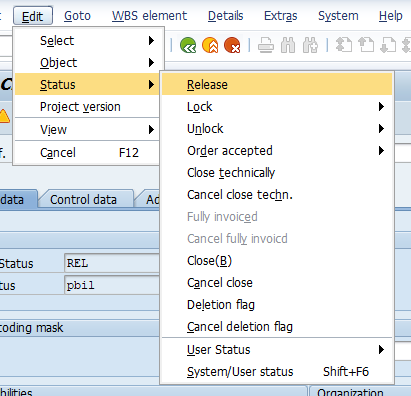
    I did that for RELEASE and see this - the OK Code is STFR for release
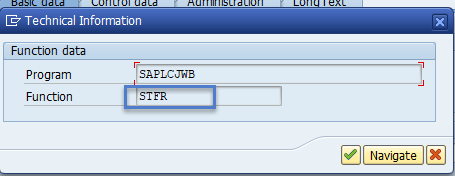
    Repeat for all the statuses you want to automate, making note of the OK Code or Function as it's called above.

    I would then use a different made up field for the input in Excel - use a dropdown so it's clear on what they can pick
    Release 
    Technically complete
    Locked
    ....

    Record one - then you have the script that does it.  Then, copy the OK code line and use IF logic in Expert Mode, like
    If column C = "Release' use ok code STFR 

    Something like this - and note you can use IF - THEN - ELSE if you want, as well
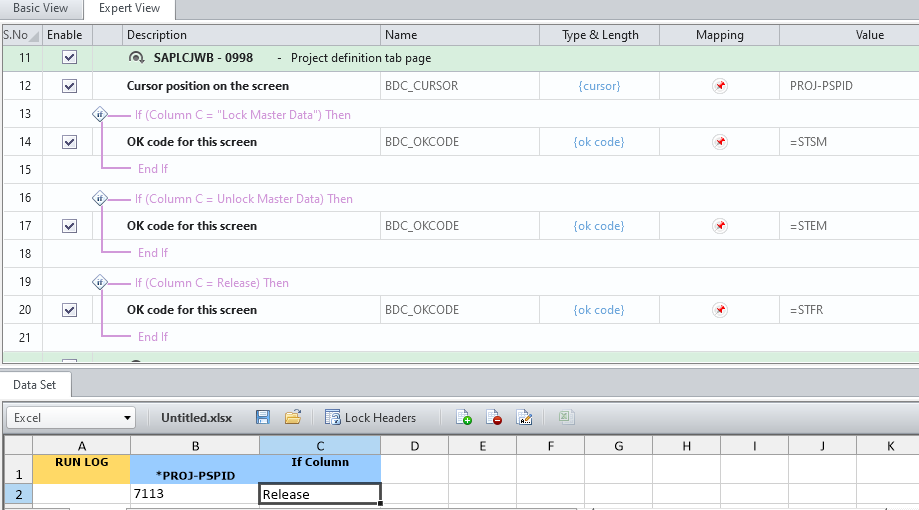
    Add as many IF statements as you need for all the statuses you want to automate setting.

    HTH
    Sigrid

    ------------------------------
    Sigrid Kok
    PSE | Winshuttle NA
    ------------------------------