Automate

 View Only
  • 1.  BAPI scripts

    Posted 04-07-2021 10:19
    I need to add some more fields to a BAPI script.  I'm unable to get back to the tables and select more rows since publishing to Foundation.  I search for the BAPI but when i click on create from BAPI it throws an error and closes winshuttle.  Anyone know if you can modify a published BAPI script?

    ------------------------------
    Anita Mefford | Winshuttle
    ConocoPhillips | 19186614935
    ------------------------------


  • 2.  RE: BAPI scripts

    Employee
    Posted 04-07-2021 20:02
    Hi Anita

    You should be able to download a copy of the script to your desktop and make adjustments there.  Once it's working, resubmit it to Foundation and replace the prior version.

    Best Regards,
    Sigrid

    ------------------------------
    Sigrid Kok
    PSE | Winshuttle NA
    ------------------------------


  • 3.  RE: BAPI scripts

    Posted 04-08-2021 08:09
    Hi Anita,

    I had this same issue. Sigrid's advice may or may not work. It did not work for me. Even the times when I had a copy saved locally or in the cloud. Sometimes I am able to edit, other times I am not. There doesn't seem to be any rhyme or reason for it. I was issued a custom version of Studio by support, however, I still run into the same problem.

    ------------------------------
    Vanessa Kutasi | Application Analyst II
    IDEXX | New England WUG Leader
    ------------------------------


  • 4.  RE: BAPI scripts

    Posted 04-08-2021 08:47

    Pulling it from Foundation and saving it locally does not help,  I'm on version 11.2.17.  I ended up recreating the script.  But this time I went into each table of the Bapi and selected all fields.  Then I disabled the fields we was not using.  I loaded to Foundation.  Now I've gone back in to edit and once again I can't pull in the BAPI, it throws an error, but I can click on view disabled fields and select the extra fields that are now needed. 


    Anita Mefford

    ERP Technical, FI

    ConocoPhillips | POB 02-210-03 |Bartlesville, OK 74004
    Office: 918-661-4935 | Mobile:  918-273-8612

    Submit a Winshuttle Support Ticket HERE

    Email: anita.r.mefford@cop.com

    ERP Signature Line


  • 5.  RE: BAPI scripts

    Employee
    Posted 04-08-2021 09:37
    Hi Anita

    Opening it directly from Foundation to edit is not the method to use, but it seems like you have saved it locally which should work.  Please note I also save a copy of everything I submit to Foundation/Evolve prior to submission.  So I usually revert back to that copy to make adjustments, but you shouldn't have to do it that way, as a local save should work.  Sorry to hear that it does not.

    I don't have a copy of v11 to try this with.  I would suggest opening a support ticket to see if they can help you.

    Best Regards,
    Sigrid

    ------------------------------
    Sigrid Kok
    PSE | Winshuttle NA
    ------------------------------


  • 6.  RE: BAPI scripts

    Employee
    Posted 04-08-2021 13:29
    Hi again Anita

    I was able to reproduce this with Foundation 12, when you open a script directly from Foundation in Studio, even after you save it locally.

    Instead, if you go to the Transaction scripts folder, find your script, right click and download to your PC (aka save link as)
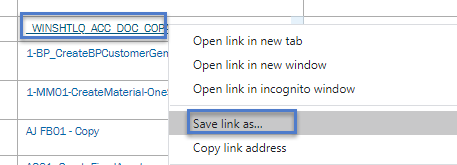
    and then open the locally saved script in Studio, the Workspace will show all of the tables and allow you to modify your field selection.

    It's a bit round about, but it will allow you to modify the script without having to recreate it.

    FYI
    Sigrid

    ------------------------------
    Sigrid Kok
    PSE | Winshuttle NA
    ------------------------------


  • 7.  RE: BAPI scripts

    Posted 04-08-2021 15:03

    That worked.  Thank you so much.


  • 8.  RE: BAPI scripts

    Employee
    Posted 04-08-2021 15:06
    I'm happy worked for you, too, Anita!

    Best Regards,
    Sigrid

    ------------------------------
    Sigrid Kok
    PSE | Winshuttle NA
    ------------------------------