Hi Robert -
If you take the leftmost column and remap that one, using drag and drop, you will see its new column value highlighted in red and also new button available.
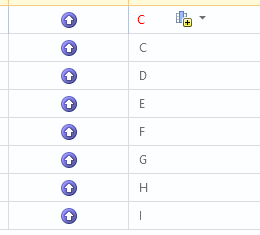
If you click on the triangle down, you will have an option for how you want that remapping to behave. If you select "Insert Before", then it will also remap all the subsequent column mapped fields.
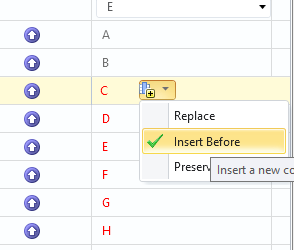
So that is one "quick" way.
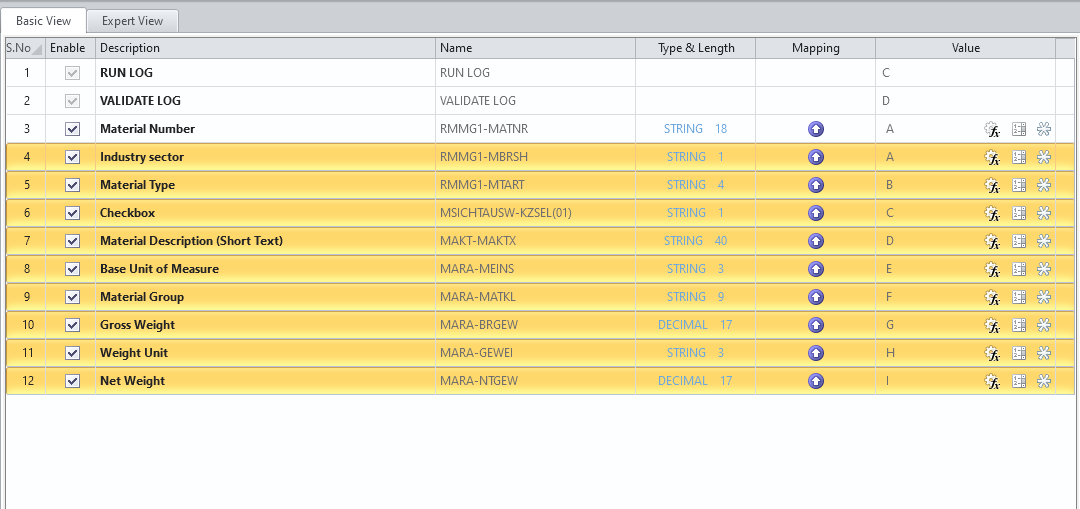
Another quick way is if you have all of your mappable fields in the right order already in the basic tab, and you want them to be mapped left to right, you can select all of the fields you want to remap, and then just remap the top most field with your left most column, by dragging and dropping. It will map all the selected fields in mass so you don't have to do it one by one. Again, that only works if they're all in the right order.
Hope this helps!
Thanks!
------------------------------
Jennifer Hwang | SE
Winshuttle North America
------------------------------
Original Message:
Sent: 03-10-2021 08:12
From: Robert Dudziak
Subject: ME12 - selecting Standard/Consignment/Sub-Contracting
Hi Jennifer,
Thanks for response and sorry for delayed reply from my side. I did changes from a scratch and it looks to be working.
Do you maybe know how can I move in the fast way mapped fields 1 to right? e.g. from column A to B, from B to C etc. I need to add 1 column which will be placed in A. Usually I did it manually, however maybe there is a better way :).
------------------------------
Robert Dudziak | Senior Procurement Operations Analyst
Kimberly-Clark Corporation |
------------------------------
Original Message:
Sent: 02-24-2021 10:32
From: Jennifer Hwang
Subject: ME12 - selecting Standard/Consignment/Sub-Contracting
Hi Robert -
I just tried this myself, setting it up like you, and it's working fine. Can you check the padding on each of those radio button fields?
Thank you!
------------------------------
JENNIFER HWANG | SE
Winshuttle North America