Automate

 View Only
  • 1.  Query with Excel Sheet Protection

    Posted 01-19-2021 03:34
    Hello,

    Is it not possible to execute a query with an excel sheet protection?
    The transaction scripts are running with the protection.
    How can i fix this?

    Regards
    Pascal

    Pascal Gygax
    Test Planner & Support
    SAP Key User – SAP Support OPS

     Confidentiality Note:  This message is intended only for the use of the named recipients and may contain confidential and/or privileged information.  If you are not the intended recipient, please contact the sender and delete this message. Any unauthorized use of the information contained in this message is prohibited.


  • 2.  RE: Query with Excel Sheet Protection

    Employee
    Posted 01-21-2021 19:16
    Hi Pascal

    Am not 100% sure I understand your question.  Can you share a bit more details?

    What I can share - a query script will extract data from SAP and write them to the mapped columns.  Depending on your setting, it will clear and write new data or append.   So the  data in those columns cannot be protected at the start row you specify.

    Best Regards,
    Sigrid

    ------------------------------
    Sigrid Kok
    PSE | Winshuttle NA
    ------------------------------


  • 3.  RE: Query with Excel Sheet Protection

    Posted 01-22-2021 04:04
    Hi Sigrid,

    Yes i know how the protection by excel works
    As soon as i activate the sheet protection, even if no rows or columns are protected, i can not execute the query script.
    Only the sheet protection is on without protected cells!
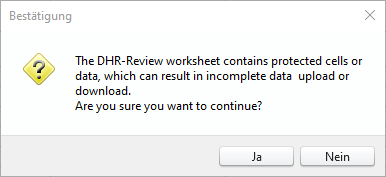
    The following Message appears:
    Best Regards
    Pascal

    ------------------------------
    Pascal Gygax | Quality Engineer
    Roche Diagnostics International AG | +4141798 53 35
    ------------------------------


  • 4.  RE: Query with Excel Sheet Protection

    Employee
    Posted 01-22-2021 08:27
    HI Pascal

    I just tried it.  I just added a password - left the rest of the protection options defaulted
    Then I ran the query and got this pop-up
    Clicked Yes and the query ran just fine.

    I'm using version v12.1.

    Have you protected columns/cells where the query is mapped?  That is what I was asking about in my first reply.  It will overlay anything in those columns. 

    Best Regards,
    Sigrid

    ------------------------------
    Sigrid Kok
    PSE | Winshuttle NA
    ------------------------------


  • 5.  RE: Query with Excel Sheet Protection

    Posted 01-25-2021 04:57
    Hello Sigrid,
    I wrote,  "no rows or columns are protected"
    I activate only the sheet protection without cells protected!
    Please check it self i uploaded the Files.


    Best Regards,
    Pascal


    ------------------------------
    Pascal Gygax | Quality Engineer
    Roche Diagnostics International AG | +4141798 53 35
    ------------------------------


  • 6.  RE: Query with Excel Sheet Protection

    Employee
    Posted 01-25-2021 20:38
    Hi again Pascal

    I opened your script and pointed to your data file.  I got the warning pop-up, but then it ran - getting no results of course, because we don't have your data.

    Is this the same experience you have?

    Another thought is to publish the script and try it running from the excel add-in, because you'll already be in the excel file.

    HTH,
    Sigrid


    ------------------------------
    Sigrid Kok
    PSE | Winshuttle NA
    ------------------------------


  • 7.  RE: Query with Excel Sheet Protection

    Posted 01-26-2021 03:55
      |   view attached
    Hi Sigrid,

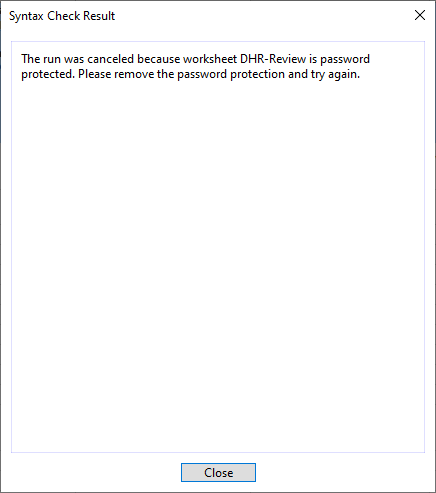
    After i confirm the warning then the syntax Check Result pop up appears. And the run is cancled!
    I upload a video of the scene above!

    Best Regards
    Pascal


    ------------------------------
    Pascal Gygax | Quality Engineer
    Roche Diagnostics International AG | +4141798 53 35
    ------------------------------


  • 8.  RE: Query with Excel Sheet Protection

    Employee
    Posted 01-27-2021 12:51
    Hi Pascal

    Sorry that our experience is different.  I'm not sure why that is happening. 

    Can you please open a support ticket to see if they can help?

    Best Regards,
    Sigrid

    ------------------------------
    Sigrid Kok
    PSE | Winshuttle NA
    ------------------------------


  • 9.  RE: Query with Excel Sheet Protection

    Posted 01-28-2021 04:04
    Hi Sigrid,

    Thank you for your information.
    Bevor i create the ticket can you check again my script with the Winshuttle Version 11.2 (32 Bit) Build-Nummer. 001701201
    This is the Version that i use, perhaps in a newer version the erro doesent appear!

    Best Regards
    Pascal

    ------------------------------
    Pascal Gygax | Quality Engineer
    Roche Diagnostics International AG | +4141798 53 35
    ------------------------------


  • 10.  RE: Query with Excel Sheet Protection

    Employee
    Posted 01-28-2021 09:41
    Hi Pascal

    I'd like to help, but Internally I use version 12.1 (Connect) and version 20.1 (Evolve/Studio Manager).  I no longer have version 10 or 11.

    Please be advised about product support availability, as I believe version 11 will need to be upgraded:  https://docs.winshuttle.com/en-gen-support-info/product-support-availability-12.1.x.htm
    Newer versions of Studio will typically perform better, provide additional features, support newer versions of SAP and the SAP GUI, and incorporate fixes, as needed.

    Best Regards,
    Sigrid

    ------------------------------
    Sigrid Kok
    PSE | Winshuttle NA
    ------------------------------