HI Bill
Sorry for the delay in my reply.
The bulk option for repeating web services is new with version 12.1. It will run all records on SAP a bit faster. However the repeating web service you have in place should suffice for posting multiple condition records.
That is all that would be different for previous versions in this scenario. Everything else would apply for pretty much any version of Composer.
There is no trick to running through multiple records, just:
- make the web service repeating when you import it, which you have
- make sure all of the fields in the repeating web service are in the same repeating group . You would only worry about this if you are trying to re-use fields in your form.
- make sure the allow run field is set to 'true' for the records you want to post, i.e. it's checked, as it is a checkbox
- make sure you have a web service control on your form view
- either use a rule or choose a button to trigger the web service. What you have outlined above should work
-
Hope that helps confirm the approach. Best of luck!
Best Regards,
Sigrid
------------------------------
Sigrid Kok
pse | Winshuttle North America
------------------------------
Original Message:
Sent: 08-30-2019 15:57
From: Bill Wonneberger
Subject: Cannot Post Data to a Web Service Call for VK15 Table 005 & Condition Type ZPR1
Hi, Sigrid;
Thank you very, very much for your reply and suggestions. Your approach for posting the data to the web service and confirming the count of the number of pricing records posted displayed in a form group without any custom JavaScript seems to be much simpler and direct. And with less code, far less error or bug prone.
Before I try changing my approach to posting SAP data through the Web Service call, I do have a number of questions on how make the changes my Winshuttle Composer solution to follow your approach for calling and confirming what Pricing data is posted to the Web Service.
- There is a difference in Transaction Script Web Service Field Mapping values in your approach compared to what I have, namely the Single Upload and Bulk Upload radio buttons under the Group Name text box:
Are the Single Upload and Bulk Upload radio buttons under the Group Name text box specific to your version of Winshuttle Composer? The reason I ask is that we're running Winshuttle Composer Version 11.2.1, and I recall from your previous reply that you were using Version 12 of Winshuttle Composer, and these two radio buttons do not appear in my Transaction Script Field Mapping dialog box.
- I also was curious about how you configure and set up the Web Service for the Winshuttle Composer. When we create and save our Transaction Script for the Web Service inside Winshuttle Studio for importing it into Composer, are there any setting or changes that are required to allow the Transaction Script and Web Service to repeatedly call our Web Service? For example, must we save and use the Web Service from an XML file, or have the .Txr set with a different option to make the web service call take place separately for each row in our Pricing Updates repeating table control.
- In place of our custom JavaScript event handler, onExecuteSoldToPricingGroup(), is the following correct to bind our Execute button to post the Pricing changes to our Web Service? Again, I am assuming what you shared in your reply for binding the button to call the Web Service is specific to Winshuttle Composer Version 12. I am hoping that you can tell me if the same steps that follow would provide the same functionality in calling the Web Service in our Form Solution using Winshuttle Composer Version 11.
First, I would create a New Rule using the Create Rule dialog box, and then have the Type value in its dropdown combo box set to Actions, then click on the Add button to set the custom action:
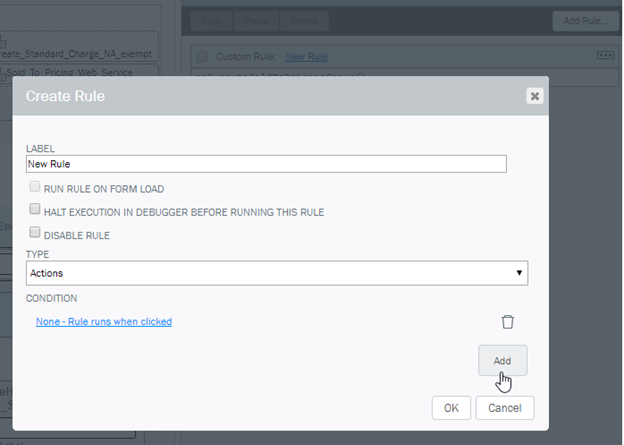
Then to complete the button binding to executing the Web Service to post the pricing data in our form's repeating table, I would then set the Action value in the dropdown list in the Add Rule Action dialog box to Execute Web Service, and then select the name of our Pricing update web service in the Web Service Control dropdown list:
Are there any other changes to bind the calling of the Web Service from the Pricing form's button in Winshuttle Composer 11 that I need to make or be aware of to match your implementation?
Again, many, many thanks for your time, help and patience.
------------------------------
Bill Wonneberger
bill.wonneberger@versummaterials.com
------------------------------
Original Message:
Sent: 08-30-2019 10:43
From: sigrid kok
Subject: Cannot Post Data to a Web Service Call for VK15 Table 005 & Condition Type ZPR1
Hi Bill
Not a Javascript expert - I can read it, but I am wondering why you need it. I have a solution that updates a bunch of pricing conditions, and I can get a count and run the web service without Javascript.
Web service fields - all in the same repeating group
I have a button with a rule run the post the price updates:
I also have a group with number of rows and number of rows processed that display when I click to post the updates.
- Count number of rows uses a default value setting with the Count function passing in the field name: count('/my:myFields/my:PricingUpdates/my:PricingUpdates_Input/my:Repeating_Content/my:LogField')
- Count number of rows processed keys off of the Logfield - if it has Success (for validate) or Condition records saved (for post) it is counted in number processed: count('/my:myFields/my:PricingUpdates/my:PricingUpdates_Input/my:Repeating_Content/my:LogField',"Condition records saved|Success")
The allow_run field is checked.
Did I miss something that the javascript is doing that can't be done without it in this use case?
Best Regards,
Sigrid
------------------------------
Sigrid Kok
pse | Winshuttle North America