Automate

 View Only
  • 1.  Script for Analyzing PO Line Item History

    Posted 04-16-2019 08:41


    A user has requested data of P.O. maintenance history for certain buyers, over a certain period such as current month-to-date.


    I have started with a script using table CDHDR. In the criteria I have EINKBELEG for CDHDR.OBJECTCLAS, the buyer (SAP) names for CDHDR.USERNAME and a date range for CDHDR.UDATE. This script works fine. Run time is quite good.


    Now the user wants to know this activity by P.O. Line Item. I started analyzing the table called CDPOS, and built a separate script to test and view its data. No problems here with run time. My plan is to combine these two scripts through a table join.


    However, this new combined script keeps getting process timed out and I am unable to get any data. I tried running it in background mode and that doesn't help.


    Any tips or suggestions would be greatly appreciated.


    Paul Callaghan, CPA, CMA

    Business Analyst Reporting


    Office: 519-740-7477 extn 3578


    Cell: 519-240-0346


  • 2.  RE: Script for Analyzing PO Line Item History

    Posted 04-17-2019 05:18
    Hi Paul. 

    I don't think you can use CDPOS in a join. If I try to join CDHDR and CDPOS in SAP I get an error: Table CDPOS cannot be used in a join. 

    Best regards
    Nina

    ------------------------------
    Nina Løvik | SAP consultant
    Vectura AS | 97088989
    ------------------------------


  • 3.  RE: Script for Analyzing PO Line Item History

    Posted 04-30-2019 16:09
    Can you take a screen cap of your query text and share?  If you just click "number of entries" does it return a result?  Also for giggles try putting a really granular filter on your left most table and see what happens?  


    For what it's worth:  
    -Time outs are super frustrating because you're not actually getting a message back.  I get them from time to time when monkeying with change docs, partners, etc.  
    -CDHDR/CDPOS is a pig data set.  I generally try to avoid joining it to anything unless the results are totally and 100% predictable 
    -Instead, I'll use query 1 to fetch a set of results (IE, PO numbers I guess) and put it in a text file.  I'll use query 2 to read and pass the list in the text file to winshuttle via the in statement with the dynamic list.  


    ------------------------------
    Daniel Lozanski | BT AM BA LOG
    Siemens Building Technologies, Inc. |
    ------------------------------


  • 4.  RE: Script for Analyzing PO Line Item History

    Posted 05-01-2019 09:51

    Thanks for your response Daniel.


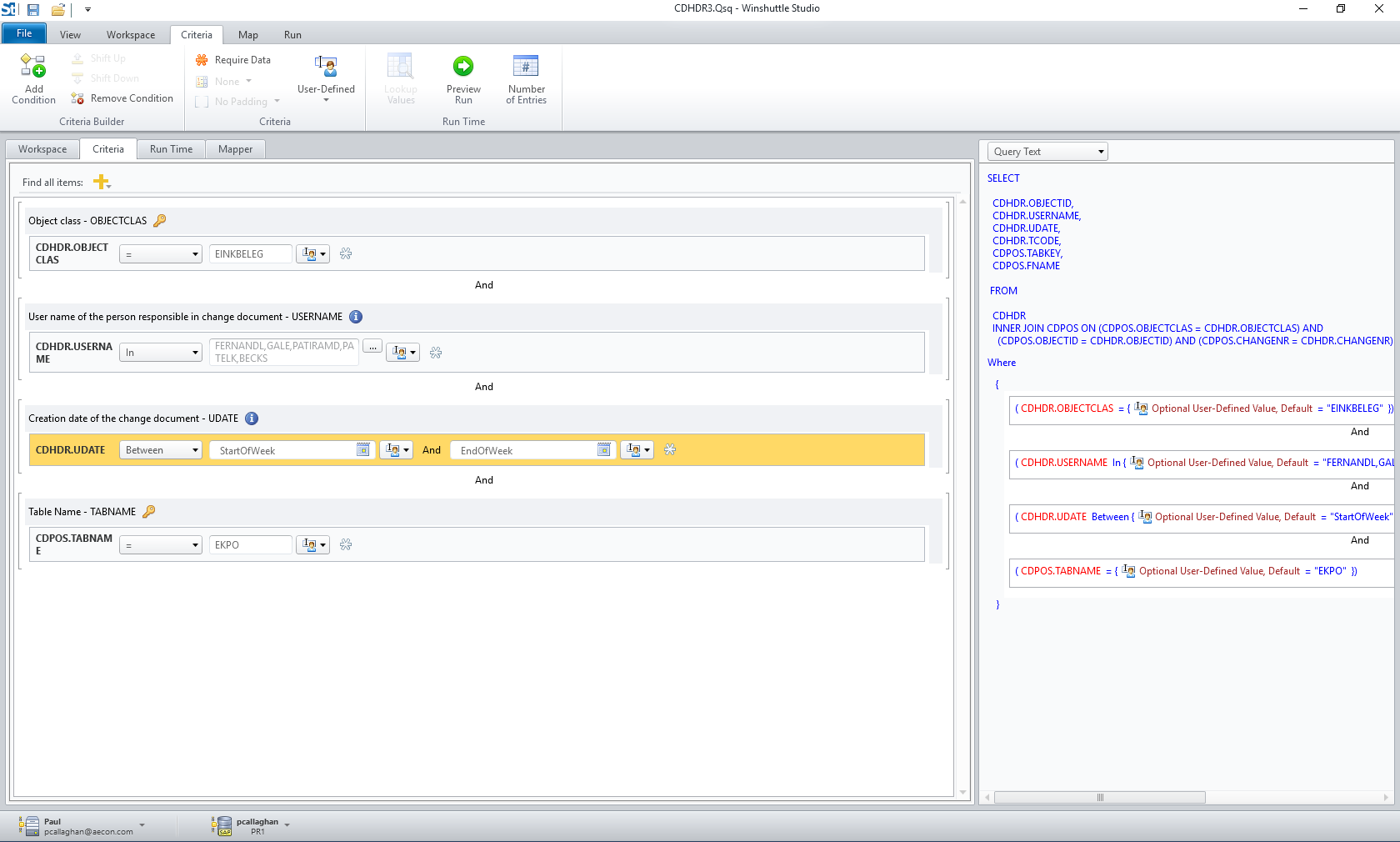
    After some further testing I believe I know why it is running forever, but not sure how to correct it. Here is a screen shot of the query text. This script runs fine.


    When I add a criteria on the CDPOS.FNAME field to only give me records with AEDAT it runs forever. I tried "= AEDAT" with post padding of spaces, I tried "=AEDAT" with no padding, and I tried "Like AEDAT*".


    Does anyone have any suggestions or tips?


    https://higherlogicdownload.s3.amazonaws.com/WINSHUTTLE/MessageImages/42d2ee85834e43cc86bc7e0758090b68.png


    Paul Callaghan, CPA, CMA

    Business Analyst Reporting


    Office: 519-740-7477 extn 3578


    Cell: 519-240-0346


  • 5.  RE: Script for Analyzing PO Line Item History

    Posted 05-02-2019 12:18
    Let's try limiting the join to just doc number.  Test that, see what happens.  


    Next diagnostic step would be dump your filters on the right table leaving only filters on the left most table.  I realize this will return results outside of your business case, but it's just to help us try to figure out where the bad behavior might be.  


    ------------------------------
    Daniel Lozanski | BT AM BA LOG
    Siemens Building Technologies, Inc. |
    ------------------------------


  • 6.  RE: Script for Analyzing PO Line Item History

    Posted 05-03-2019 16:36


    Okay Daniel, thanks again for your input.


    I tested for one link only, the CHANGENR field. When I remove the two other links, OBJECTCLAS and OBJECTID and run the script, it runs forever.


    Next, I put all three links back in place, and then removed all criteria in the right most table, CDPOS.


    I was able to run this script. It took a lot longer and produced a large number of records, no doubt.


    Now what do you suggest I do?


    Paul Callaghan, CPA, CMA

    Business Analyst Reporting


    Office: 519-740-7477 extn 3578


    Cell: 519-240-0346


  • 7.  RE: Script for Analyzing PO Line Item History

    Posted 05-31-2019 18:30
    Hi Paul, 

    If you'd like to put in a support case here: https://community.winshuttle.com/create-support-ticket, our team would be happy to assist. Please include your latest copy of the query for review. 

    Thanks!

    ------------------------------
    Winshuttle Training
    Winshuttle | Bothell
    ------------------------------


  • 8.  RE: Script for Analyzing PO Line Item History

    Employee
    Posted 06-01-2019 11:24
    Hi Paul - I was able to replicate your query and run it.  Our system doesn't have a lot of data in it, so it ran fine.  But if yours does return a lot and/or processes a lot of data to find what to return, you might consider enabling throttling and using data chunks - see the doc here:  https://winshuttle-help.s3.amazonaws.com/studio/en/connect-sap/help/12/query-run-settings.htm#sts=Data%20Chunks   
    Besides returning data in "chunks", it helps with timeouts, because the connect to SAP remains active - rather than waiting for everything to be retrieved and returned at once, which can cause a timeout.  Note that throttling may slow the query down, but getting results slower is better than getting no results in my book.  :) 

    Hope this info helps,
    Sigrid

    ------------------------------
    sigrid kok
    PSE | Winshuttle North America
    ------------------------------


  • 9.  RE: Script for Analyzing PO Line Item History

    Posted 06-04-2019 08:49


    Thank you Sigrid, for the follow up.


    I was able to get my script running.


    I kept the three joins in place, and set up only one criteria in the right-most table, CDPOS.


    My run-time is now reasonable. If I ask for a lot of data based on an old cut-off date then it takes awhile, which makes sense to me.


    I do not require any further assistance.


    Paul Callaghan, CPA, CMA

    Business Analyst Reporting


    Office: 519-740-7477 extn 3578


    Cell: 519-240-0346