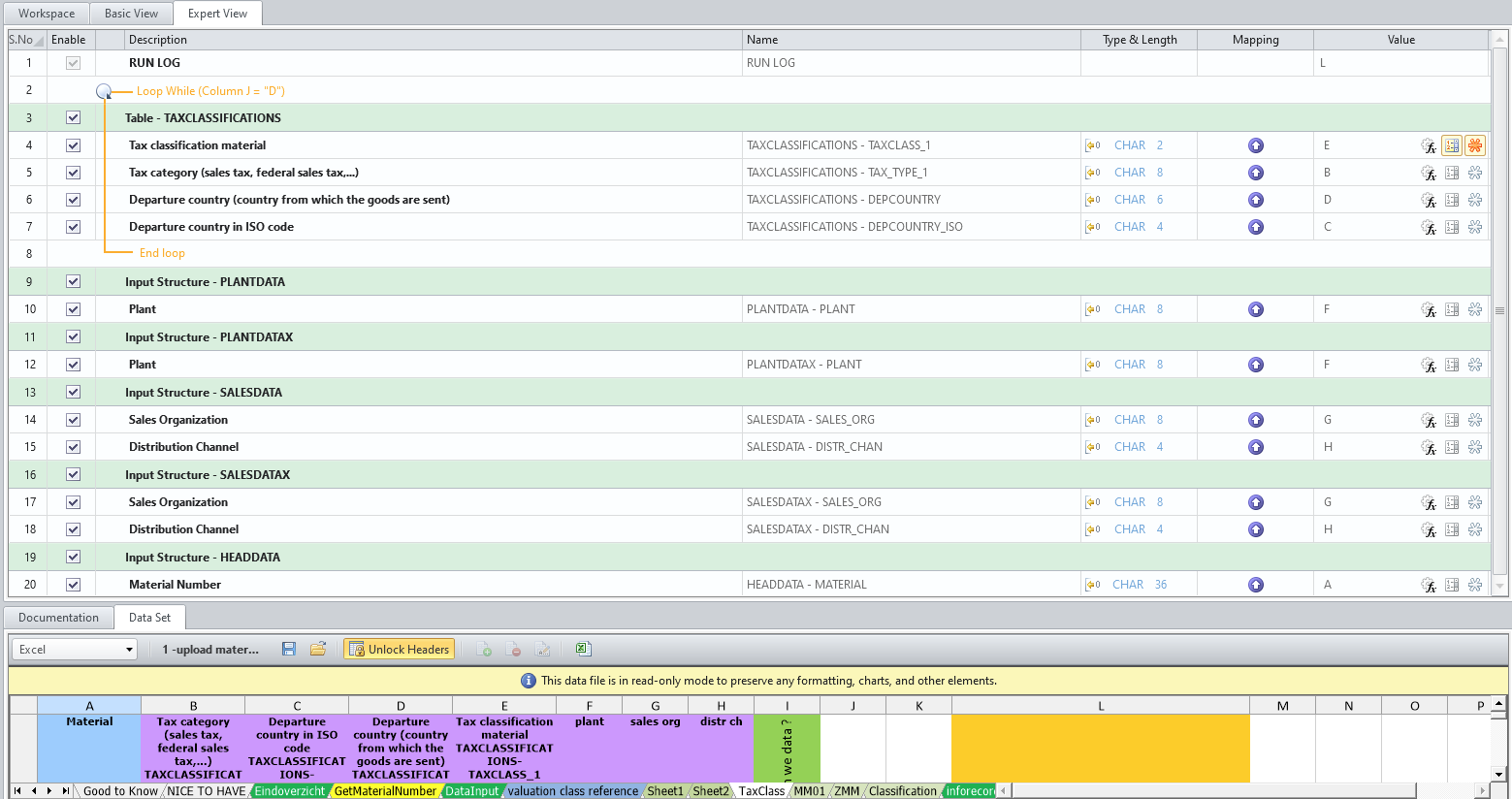
here is an example using BAPI_MATERIAL_SAVEDATA, this little script is part of a large chain used for MM upload:
------------------------------
jan ketele | Sr engineer release mgt
Xeikon Manufacturing NV | +3234431875
------------------------------
Original Message:
Sent: 01-29-2021 16:25
From: sigrid kok
Subject: Transaction MM01: Material Master Record creation, Tax Data in Material Master Record
@Marco
The goal of the community to share questions and answers, learning from each other. Please don't send me private messages, as it defeats the purpose. :)
Your reply to my questions:
- how many tax classes are you working with? At the moment maximum 6, MLAN.TAXM1 to MLAN.TAXM6
- are they consistent for the sales areas, i.e. the same? No, it depends on MLAN.ALAND, the delivering country
- are you updating all of them or just selective tax classes? It must be possible to add new classes or to modify existing classes, if they are wrong. In my actual case 4 classes are already filled, we want to fill 2 more due to local legal requirements.
To have also a history it would be fine to have one sheet with reading tax classes, the other sheet only to maintain or complete classes. For only reading i have already made a query, Tables MARA, MLAN, and MVKE, that was easy, but i have nothing to maintain it via bulk with Winshuttle via MM02.
For 2 above, the consistency question had to do with the number of tax classes in your sales org/dist channel combination, and that they were all the same, i.e. tax class 1 is DE MWST, tax class 2 is US UTXJ, etc. Also, are they the same across various sales org/dist channel combinations?
For 3 above, you state you want to update 2 but then you state you want to update all of them. Which is it please?
For output, you have options
- Query, which you have done - best suited for input with loops
- Use a BAPI to extract based on a list of materials - best suited for input with loops, although you can copy the tax table and have individual fields for all 6 tax classes, giving you 18 output and input fields, basically flattening the data to one row
- Use a Transaction GUI script based on a list of materials - best suited to input with a single row
For loads:
- For Transaction, you will have to use GUI scripting:
- to position to the right row if you want to update individual tax classes
- or if you want to navigate through the tiny window that shows the tax classes, i.e. scroll down or hit page down, to either read or update all of them
Neither will work with batch/non-batch.
- Or you can use BAPIs:
- BAPI_MATERIAL_SAVEDATA to update the tax classes, passing in the material and then for taxes the departure country, type and class.
- BAPI_MATERIAL_GET_ALL to read the tax classes, passing in material number, sales org and distribution channel
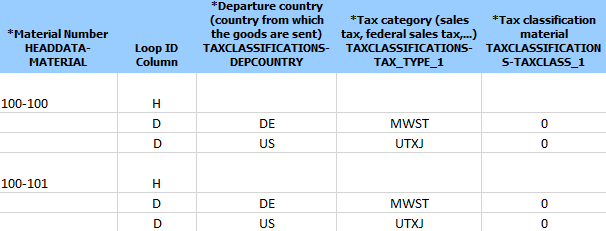
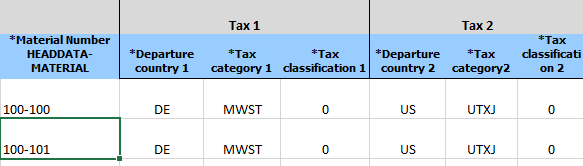
You can format in a loop, which is the default, or single row, which means copying & pasting the tax table in Expert Mode and having input fields for each set of tax input fields - departure country1, tax type1, tax class1; departure country 2, tax type2, tax class2; etc - flattening out the data.
The loop is more flexible, but more work to format the input. The flattened data is easier to use, but doesn't offer the same flexibility as a loop, in that you have to accommodate the number of tax classes you want to work with.
You'll also have to consider the various sales org/distribution channel combinations you have. For example in my demo system:
- 1000/10 has 2 tax classes
- 3000/10 has 7 tax classes
So you'd either have to create scripts to handle each individually, or one script with the maximum number of tax classes and then use IF conditions to skip the input if they're blank.
Loop input format example
Flattened input example
Those are you options. Please think about what you want to do, what would be best for the people using the template. Let us know, and I may have an example.
Best Regards,
Sigrid
------------------------------
Sigrid Kok
PSE | Winshuttle NA
------------------------------
Original Message:
Sent: 01-28-2021 10:08
From: Sigrid Kok
Subject: Transaction MM01: Material Master Record creation, Tax Data in Material Master Record
Hi Marco
Some questions first, please.
- how many tax classes are you working with?
- are they consistent for the sales areas, i.e. the same?
- are you updating all of them or just selective tax classes?
The answer to those questions would drive the best approach.
The simplest method would be if you have a list of materials and the sales area data to read them and update them in Transaction in one row. If you use a BAPI or query to read them, you'll end up with a row per tax class for each material, so it's harder to format for input.
Please advise,
Sigrid
------------------------------
Sigrid Kok
PSE | Winshuttle NA
Original Message:
Sent: 01-28-2021 09:48
From: Marco
Subject: Transaction MM01: Material Master Record creation, Tax Data in Material Master Record
Hello Sigrid,
Now i have the request to read and maintain tax data in material master record, via bulk in one sales org.
I want to use transaction, maybe via MM02 do do that, i am not familiar in using BAPI at the moment.
Do you have an example, a skript template which i can use?
Many thanks for your support!
Best Regards
Marco
Original Message:
Sent: 01-21-2019 09:40
From: Sigrid Kok
Subject: Transaction MM01: Material Master Record creation, Tax Data in Material Master Record
Hi Marco,
You can record the tax classifications by the screen full as independent fields, i.e. tax class 1, tax class 2, etc.
You can also use a BAPI for this: BAPI_MATERIAL_SAVEDATA. It's especially helpful if you need to find a specific tax class in the table to update it. If you want an example, please let me know.
For either approach, if you have a varying number by sales area, then you'll need to use IF statements to enter only the values you need for each one.
Best Regards,
Sigrid
------------------------------
Sigrid Kok
PSE | Winshuttle North America