Data360® Govern Update – Additional information on Roles and Security Policy changes in Dev and UAT

Last month we updated Dev and UAT environments with some significant changes to roles and responsibilities, changing them to roles and security policies. This announcement is intended to provide additional information about those changes. Also attached to this announcement are some short videos that should aid in the explanation.
Roles and Security Policies – Redesign Update (September 2025)
Why This Change?
We've completely redesigned the Roles and Security Policies section to make managing access control more intuitive, flexible, and efficient. This update simplifies role creation, improves permission management, and boosts system performance by moving to a dynamic, event-driven policy model.
What Has Changed?
1. Page Renaming & User Interface Redesign
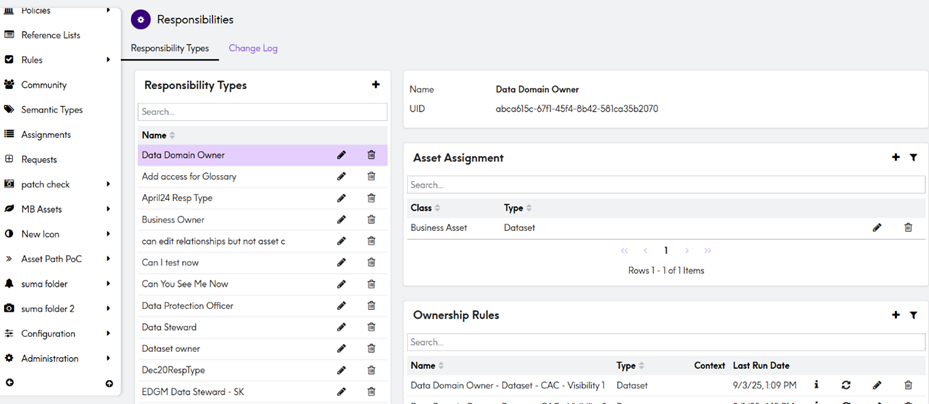
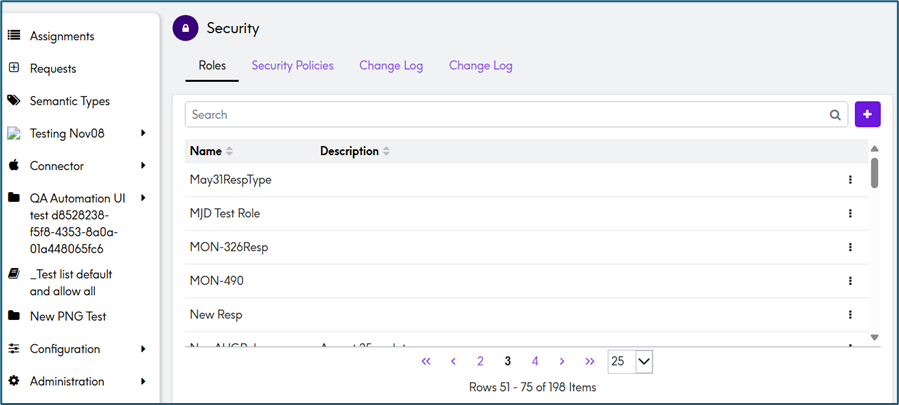
- The Administration > Security > Responsibilities page has been renamed to Administration > Security > Roles and Policies.
- The UI now features a cleaner layout for easier creation and management of Roles and Security Policies.
Before:
After:
2. Updated Terminology
- The term Ownership Rules is now Security Policies.
- Throughout the application, Responsibilities has been replaced with Roles, and Ownership has been replaced with Security Policies.
3. More Flexible Roles
- Roles can now be assigned to any asset type without restrictions or additional configuration.
- Roles no longer need to be allocated to asset types in order to make them available for assignment.
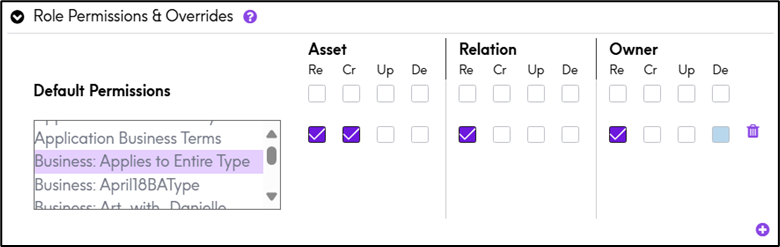
4. Enhanced Role Permissions Interface
- The permissions UI has been redesigned for better clarity and control
- Users can now configure Read, Create, Update, and Delete permissions across Asset, Relation, and Owner types.
- Default permissions can now be overridden by assigning custom permissions to multiple asset types within a role.
- Use the ➕ button to add and customize permissions for specific asset types with ease.
5. New Details Panel
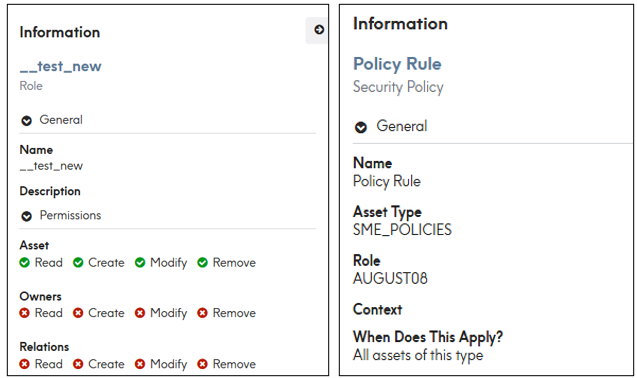
- A Details Panel has been added on the right side of the screen.
- This panel shows additional information about permissions and related security policies, making it easier to understand roles and policies details.
Role: Policy:
6. Security Policies
- The Security Policies tab lists all policies together, rather than separating them by role.
- The section previously called When is now What does the policy apply to? reflecting the conditions that determine which assets the policy applies to.
- Users can now specify the scope of the policy by choosing between:
- All assets of this type - the policy applies to every asset of the selected type.
- Certain assets based on condition - the policy apply only to assets that meet specified conditions.
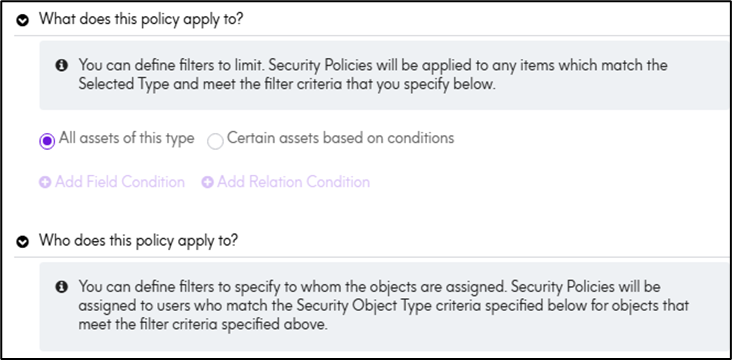
- The section previously called Then is now Who does this policy apply to?
- Policy can be applicable to specific user or group of users based on choice.
- Policies are now event-driven, triggering immediately when assets or relationships change, rather than on a schedule.
7. Ownership Tab Update:
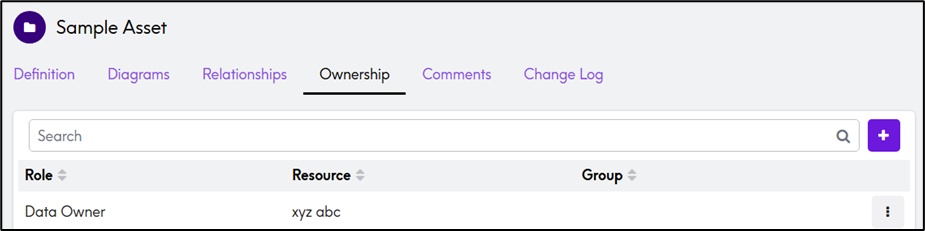
- In Assets, the Responsibility tab has been replaced with the Ownership tab.
- The Ownership tab now displays all roles associated with a particular asset along with their assigned resources.
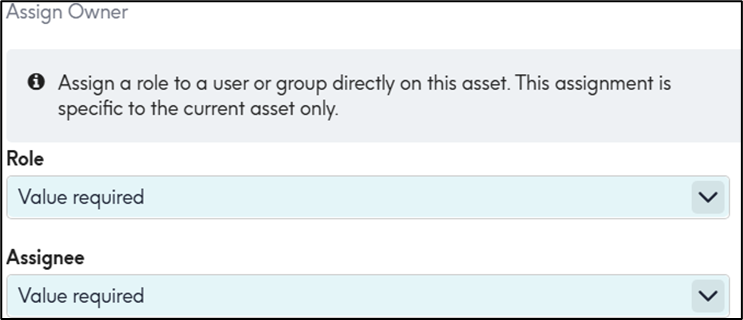
- The dropdown will now display all available roles, allowing users to assign any role to any user, regardless of whether the role is linked to a specific asset type.
- Users can override or add a new policy by clicking the ➕ button, where they can specify the role and assign it to a resource.
8. API Changes
As part of this Roles and Policies release, we've made several changes to our API offerings. These changes fall into the following categories:
New APIs:
New APIs have been introduced to enhance functionality.
|
Method
|
Endpoint
|
|
GET
|
/api/v2/security/{assetUid}/owners
|
|
Get
|
api/v2/security/policies
|
|
Post
|
/api/v2/security/policies
|
|
Delete
|
/api/v2/security/policies/{uid}
|
|
put
|
/api/v2/security/policies/{uid}
|
|
post
|
/api/v2/security/policy-overrides
|
|
delete
|
/api/v2/security/policy-overrides/{uid}
|
|
Put
|
/api/v2/security/policy-overrides/{uid}
|
|
get
|
/api/v2/security/roles
|
These endpoints are fully documented and available for use immediately.
Temporarily Re-enabled APIs:
The following legacy APIs have been temporarily re-enabled to support existing integrations. However, please note that these APIs are deprecated and are scheduled for permanent removal in 90 days.
We strongly recommend all users transition to the new Security APIs as soon as possible to avoid disruption.
|
Method
|
Endpoint
|
|
post
|
api/v2/responsibilities/types
|
|
post
|
api/v2/responsibilities/types/{uid:Guid}/allocations
|
|
Post
|
api/v2/responsibilities/types/{uid:Guid}/allocations
|
|
get
|
api/v2/responsibilities/assignments/{assetUid:Guid}
|
|
get
|
api/v2/responsibilities/hasassignments/{assetUid}
|
|
delete
|
api/v2/responsibilities/types
|
|
post
|
api/v2/responsibilities/{assetUid:guid}/{responsibilityUid:guid}
|
|
|
|
Note: These re-enabled endpoints will be hidden and will not be presented on swagger documentation.
Frequently Asked Questions (FAQ)
Q1: Do we need to re-configure the roles and security policies to ensure that use cases requiring different permission levels for different asset types within the same role are not impacted?
Ans: No, the different asset types under the same role can have unique permissions.
Q2: What are the impacts of the new role permissions no longer being assigned to specific asset types?
Ans: In the redesigned system, roles can have permissions across all asset types without explicit asset-type assignments, improving flexibility and simplifying management.
Q3: How can we ensure that the new role permissions function the same way as the old role permissions?
Ans: Since the functionality remains the same and only the UI terminology and structural mapping have been updated, Responsibility is now referred to as Role, and Ownership Rule as Security Policy.
Our primary focus is on maintaining semantic equivalence and consistent behavior.
Guides and References
See attached short videos:
- Permission Overrides in Govern
- Roles and Security Policy Changes