Glad to hear it works.
*Precisely Software Inc.
Original Message:
Sent: 10-08-2026 13:06
From: Jane Dobbs
Subject: MM01 Extend Material to plant using Copy from
Needed another cup of coffee!! I scaled the whole script down to only Material/Plant/Sloc. Don't need Sales Org and it worked great. Thanks everyone for the input as I did learn a lot doing this transaction.
------------------------------
Jane Dobbs
Canadian Pacific Railway
------------------------------
Original Message:
Sent: 10-08-2026 12:05
From: jagat kaushal
Subject: MM01 Extend Material to plant using Copy from
Hi Jane,
No worries.
The error gives it away: "Entry 8045 E" means SAP is getting the letter E as the storage location, not ST1A.
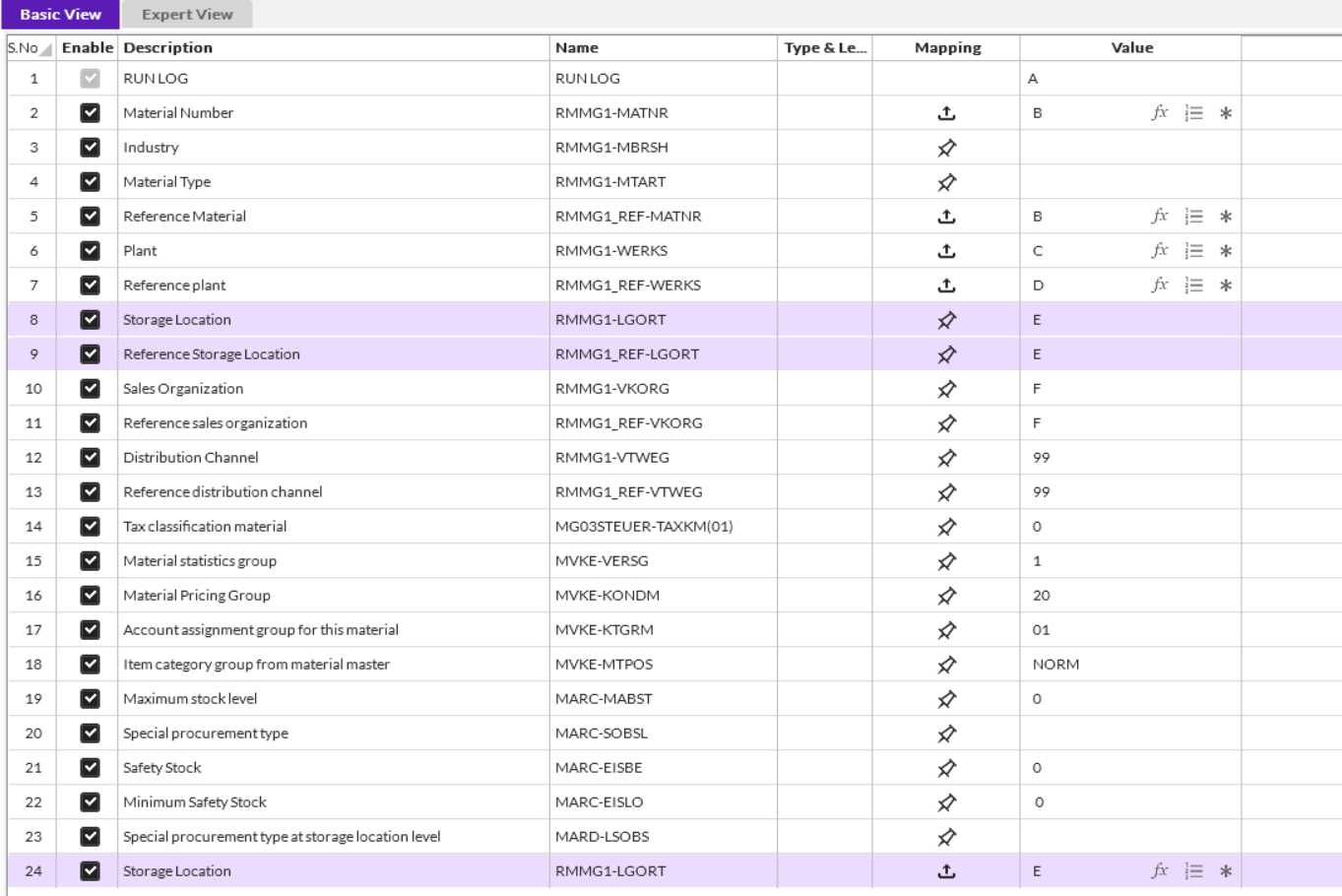
If you look at rows 8 and 9 (Storage Location and Reference Storage Location), they have the pin icon, so they're set to a fixed value of "E" and aren't pulling from column E. Row 24 has the upload icon, which is why that one works.
To fix it, change the mapping on rows 8 and 9 to map to column E, the same way row 24 is set up. Do the same for rows 10 and 11 (Sales Org and Reference Sales Org). They're fixed to "F" right now and will throw a similar error next.
Also check Industry and Material Type (rows 3 and 4). Their values look blank in your screenshot. Make sure they're filled in with something like R and Z001, or mapped to columns in your sheet. Otherwise SAP will go back to copying them and you'll get the warning again.
Give that a try. If it doesn't solve the problem, please open a ticket on the support portal and include the script file so we can investigate.
Kind Regards
------------------------------
jagat kaushal
*Precisely Software Inc.
------------------------------
Original Message:
Sent: 10-08-2026 11:51
From: Jane Dobbs
Subject: MM01 Extend Material to plant using Copy from
Thanks everyone for the input, I added the Industry and Material Type and the needle has moved. I am now getting this error. There is an entry for Plant 8045 and Storage Location ST1A in T001L

I have tried:
- Copy Storage Location/Reference
- Copy Storage Location/Reference as well as setting it in the Plant/Storage
- Only in Plant/Storage
Thanks,
Jane
------------------------------
Jane Dobbs
Canadian Pacific Railway
------------------------------
Original Message:
Sent: 10-08-2026 03:53
From: jagat kaushal
Subject: MM01 Extend Material to plant using Copy from
Hi Jane,
Anita's right. Add Industry (RMMG1-MBRSH) and Material Type (RMMG1-MTART) to the first screen of your script and map them to your sheet. If those fields are already filled when you hit Enter, SAP doesn't copy them from the reference material, and you won't get that "copied from master record" warning. That warning is why the screen sits there in Debug.
The error also says SAP is showing the Select View(s) pop-up (screen 0070), but your script jumps straight to the Org Levels screen (0080). That usually means the pop-up didn't come up when you recorded, probably because of your MM01 defaults. The easiest fix is to go into MM01 > Defaults > Views, uncheck the "only on request" options, and re-record so the pop-up gets captured. Then pick the views you need in it.
One thing to watch: the order of views in that pop-up can vary by material, so try it on a few different materials before running the whole file.
If that doesn't resolve the issue, please open a ticket through the support portal and share the script file. We'll assist you.
Kind Regards
------------------------------
jagat kaushal
*Precisely Software Inc.
------------------------------