Automate

Welcome to the Automate community!  Please feel free to start a discussion in the discussion tab or join in a conversation.

Here are some useful links where you can find more information:

Product Announcements

 View Only
  • 1.  Authorization Check - to identify Message Server and Application Server address in SAP

    Posted 29 days ago

    Hi Precisely,

    This is regarding Message Server and Application Server address in SAP. I would appreciate if anyone who can guide me on identifying SAP Messager Server and Application Server in required in Automate Studio Authorization Check process.

    Thank you.

    Regards,

    AZAR


    ------------------------------
    Ahmadzuhairi Abran
    Petronas Digital Sdn Bhd
    ------------------------------


  • 2.  RE: Authorization Check - to identify Message Server and Application Server address in SAP

    Employee
    Posted 29 days ago

    Good morning, Azar,

    For the Automate Studio Authorisation Check, the required SAP connection details depend on how the SAP system is configured in your environment. Studio supports both direct Application Server connections and Group Logon (Message Server) connections.
    How to identify the correct values
    • If users normally log in to SAP through a standard SAP Logon entry that points directly to a server:
    • Use the SAP Application Server hostname.
    • Use the SAP System Number.
    • These details can usually be viewed in the SAP Logon entry properties or provided by the SAP Basis team.
    • If users log in through a Load Balancing / Group Logon entry:
    • Use the SAP Message Server hostname.
    • Use the Message Server Port.
    • Use the SAP System ID (SID).
    • Use the Logon Group.
    • These values can be viewed in the SAP Logon entry properties or obtained from the SAP Basis team. 
    Quick way to find them from SAP Logon
    1. Open SAP Logon.
    2. Select the SAP system entry used by the customer.
    3. Click Properties.
    4. Check whether the connection type is:
      • Application Server → note the Application Server and System Number.
      • Group/Load Balanced Logon → note the Message Server, Logon Group, SID, and Message Server Port.
    When adding an SAP system in Automate Studio:
    • For an Application Server connection, enter the Application Server and System Number.
    • For a Group Logon connection, enter the SAP System ID, Logon Group, Message Server, and Message Server Port.
    Please let me know if you have any further queries about the same.
    Thanks
    Archana


    ------------------------------
    Archana Chandar
    *Precisely Software Inc.
    ------------------------------


  • 3.  RE: Authorization Check - to identify Message Server and Application Server address in SAP

    Posted 28 days ago

    Thank you for responding me. I will check with my SAP Team


    ------------------------------
    Ahmadzuhairi Abran
    Petronas Digital Sdn Bhd
    ------------------------------


  • 4.  RE: Authorization Check - to identify Message Server and Application Server address in SAP

    Employee
    Posted 29 days ago
    Edited by jagat kaushal 29 days ago

    Hi Azar,

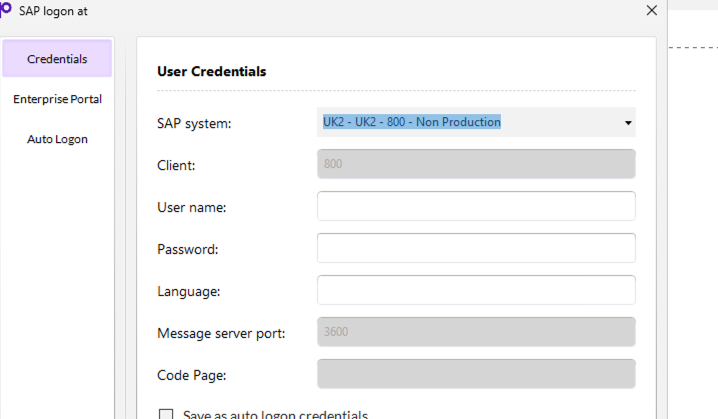
    In addition to the above, you can also check in Studio. If the SAP screen shows a message server port, it’s using the message server; otherwise, its using SAP application server.
    Regards,
    Jagat


    ------------------------------
    jagat kaushal
    *Precisely Software Inc.
    ------------------------------


  • 5.  RE: Authorization Check - to identify Message Server and Application Server address in SAP

    Posted 28 days ago

    Thank you for the guidance.


    ------------------------------
    Ahmadzuhairi Abran
    Petronas Digital Sdn Bhd
    ------------------------------


  • 6.  RE: Authorization Check - to identify Message Server and Application Server address in SAP

    Employee
    Posted 28 days ago
    Edited by jagat kaushal 28 days ago

    No worries.Let us know if you have any queries.


    ------------------------------
    jagat kaushal
    *Precisely Software Inc.
    ------------------------------


  • 7.  RE: Authorization Check - to identify Message Server and Application Server address in SAP

    Employee
    Posted 28 days ago

    Hi Ahmadzuhairi Abran,

    Happy to help.

    If you have any further queries, you can reach out to us via support.precisely.com.

    Thanks

    Archana


    ------------------------------
    Archana Chandar
    *Precisely Software Inc.
    ------------------------------